EducationSoftwareStrategy.com
StrategyCommunity

Knowledge Base

Product

Community

Knowledge Base

TopicsBrowse ArticlesDeveloper Zone

Product

Download SoftwareProduct DocumentationSecurity Hub

Education

Tutorial VideosSolution GalleryEducation courses

Community

GuidelinesGrandmastersEvents
x_social-icon_white.svglinkedin_social-icon_white.svg
Strategy logoCommunity

© Strategy Inc. All Rights Reserved.

LegalTerms of UsePrivacy Policy
  1. Home
  2. Topics

KB8883: Chinese character in document cannot be displayed when exporting to PDF in MicroStrategy Intelligence Server


Community Admin

• Strategy


Chinese character in document cannot be displayed when exporting to PDF.

SYMPTOM
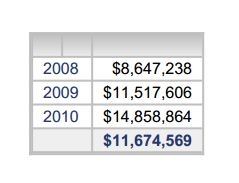
Chinese character in a document cannot be displayed when exporting to PDF in Strategy Intelligence as below:
ka04W000000OaWMQA0_0EM4400000029k3.jpeg

 
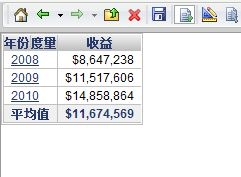
However, the document is running correctly in Strategy Web:
ka04W000000OaWMQA0_0EM4400000029jx.jpeg


CAUSE
One possible cause is that the font used does not support the double-byte character. In this case, the font "Arial" is used which does not support Chinese character.
 
ACTION
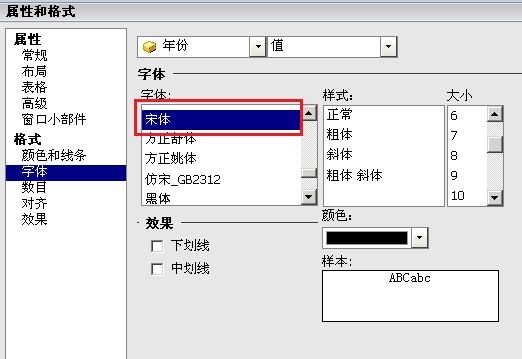
Run the document in Editable mode. Select the grid and right click it > Properties and formatting> Format > Font, choose the right font for the double-byte character. In this case, "宋体" is used as below:
ka04W000000OaWMQA0_0EM4400000029k1.jpeg

  
Article Reference Number: 
KB8883


Comment

0 comments

Details

Knowledge Article

Published:

May 22, 2017

Last Updated:

January 1, 2019