EducationSoftwareStrategy.com
StrategyCommunity

Knowledge Base

Product

Community

Knowledge Base

TopicsBrowse ArticlesDeveloper Zone

Product

Download SoftwareProduct DocumentationSecurity Hub

Education

Tutorial VideosSolution GalleryEducation courses

Community

GuidelinesGrandmastersEvents
x_social-icon_white.svglinkedin_social-icon_white.svg
Strategy logoCommunity

© Strategy Inc. All Rights Reserved.

LegalTerms of UsePrivacy Policy
  1. Home
  2. Topics

KB8898: What database connections are used for datamart pre/post statements?


Community Admin

• Strategy


When a non-datamart report is executed, the Structured Query Language (SQL) is executed against the database defined by the project's database instance.
 
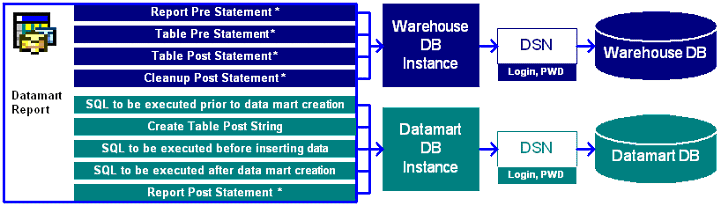
When a datamart report is executed and the results are stored in another database, specified from Data -> Configure Data Mart -> Data mart database instance, the behavior changes as illustrated in the following diagram:
 

ka04W000000OhPVQA0_0EM440000002G3m.gif

* The VLDB property is available within the REPORT'S VLDB properties editor. The other settings are found under the datamart properties editor.
 
Example:


If you want to add one more serverSet "append=true"If you want to replace all existing server listsSet "append=false"SQL

Pass0 - Duration: 0:00:00.04
delete test.dbo.t1 -- Report Pre Statement, executed against the Warehouse DB Instance

Pass1 - Duration: 0:00:00.00
delete test.dbo.t1 -- Table Pre Statement, executed against the Warehouse DB Instance

Pass2 - Duration: 0:00:00.02
select a12.YEAR_ID YEAR_ID,
sum(a11.TOT_UNIT_SALES) WJXBFS1
into #ZZTPV00E1WBMD000
from
join
on (a11.QUARTER_ID = a12.QUARTER_ID)
group by a12.YEAR_ID

Pass3 - Duration: 0:00:00.07
delete test.dbo.t1 -- Table Post Statement, executed against the Warehouse DB Instance

Pass4 - Duration: 0:00:00.02
delete test.dbo.t1 -- Table Pre Statement, executed against the Warehouse DB Instance

Pass5 - Duration: 0:00:00.07
select a15.YEAR_ID YEAR_ID,
sum(a11.TOT_UNIT_SALES) WJXBFS1
into #ZZTPV00E1WBMD001
from
join
on (a11.CALL_CTR_ID = a12.CALL_CTR_ID)
join
on (a11.DAY_DATE = a13.DAY_DATE)
join
on (a13.MONTH_ID = a14.MONTH_ID)
join
on (a14.QUARTER_ID = a15.QUARTER_ID)
where (a15.YEAR_ID in (2000)
and a12.COUNTRY_ID = 0)
group by a15.YEAR_ID

Pass6 - Duration: 0:00:00.00
delete test.dbo.t1 -- Table Post Statement, executed against the Warehouse DB Instance

Pass7 - Duration: 0:00:00.09
select pa1.YEAR_ID YEAR_ID,
pa1.WJXBFS1 WJXBFS1,
pa2.WJXBFS1 WJXBFS2
from
join
on (pa1.YEAR_ID = pa2.YEAR_ID)

Pass8 - Duration: 0:00:00.03


Pass9 - Duration: 0:00:01.24
drop table TEST

Pass10 - Duration: 0:00:00.00
delete test.dbo.t1 -- DM - SQL to be executed prior to data mart creation, executed against the Datamart DB Instance

Pass11 - Duration: 0:00:00.04
create table TEST (
YEAR_ID SMALLINT,
WJXBFS1 FLOAT,
WJXBFS2 FLOAT)
delete test.dbo.t1 -- DM - Create Table Post String, executed against the Datamart DB Instance

Pass12 - Duration: 0:00:00.01
delete test.dbo.t1 -- DM - SQL to be executed before inserting data, executed against the Datamart DB Instance

Pass13 - Duration: 0:00:00.09

Pass14 - Duration: 0:00:00.04
delete test.dbo.t1 -- DM - SQL to be executed after data mart creation, executed against the Datamart DB Instance

Pass15 - Duration: 0:00:00.00
delete test.dbo.t1 -- Report Post Statement, executed against the Datamart DB Instance

Pass16 - Duration: 0:00:00.03
drop table #ZZTPV00E1WBMD000

Pass17 - Duration: 0:00:00.13
drop table #ZZTPV00E1WBMD001

Pass18 - Duration: 0:00:00.00
delete test.dbo.t1 -- Cleanup Post Statement


Comment

0 comments

Details

Knowledge Article

Published:

May 22, 2017

Last Updated:

May 22, 2017