SUMMARY:
An XML (Extensible Markup Language) cache is a report cache in XML format. When a report is executed from Strategy Web, an XML cache is created and is available for use when executing the same report from the Strategy Web at a later time. Although a different format of the same report cache, the XML cache is maintained as a distinct cache and counts towards the maximum number of caches as a unique object. When the parent report cache or history list message is removed or deleted, the XML cache will be automatically removed.
When a Strategy Web user requests a report, Strategy Intelligence Server sends an XML representation of the report results back to the web server. Once the XML is created for a particular cached report, Strategy Intelligence Server will take advantage of the work it has already performed and cache the XML representation of the report. When another user executes the same report, the XML cache will be used instead of regenerating the XML.
When a report is only sent to the History List, no XML cache is generated. This is because Strategy Intelligence Server does not have to generate the XML because the results were never sent to the web server.
When viewing the cache monitor while logged in as the administrator, more than one XML cache for a particular report may be seen. This can occur for scenarios such as different prompt answers for the same report or for the instances when the report view changes. Strategy OLAP Services reports also may create multiple caches because they have a base cache and a view cache. This is related to the way Strategy Web requests the report results and is normal.
Note:
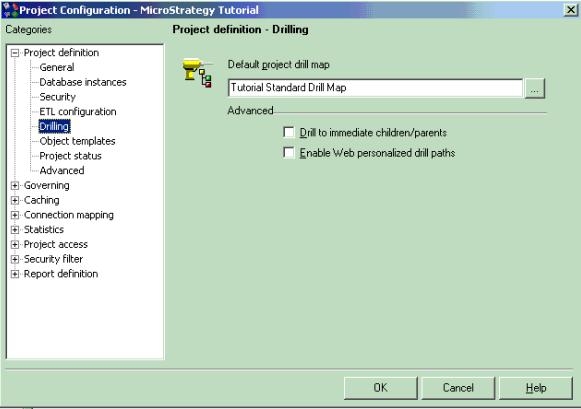
There is an option called "Enable Web personalized drill paths" was added to the Project Configuration editor > Project definition > Drilling category. This setting is disabled by default. Selecting this check box disables XML caching, which may adversely impact the Strategy Web performance.
Scenarios regarding XML cache creation:


