SYMPTOM:
When a user attempts to run the Warehouse Catalog after making changes to its objects, the following error message appears:
An error was detected while reading the warehouse catalog. Click OK to try to recover from this error.
Clicking 'OK' simply results in the same popup box appearing at a later time.
In the DSS Errors.log one of these errors is logged:
One or more of the DB Table objects referred to by the Catalog is dirty or missing. The update cannot be performed.
Unexpected Error (Line no. 0, Number: 800411AA, Description: One or more of the Column objects referred to by the Catalog is dirty or missing. The update cannot be performed.
The error persists even after following the recommendations provided in Strategy Knowledge Base document, KB5097: Tables do not appear in the box, ’Tables available in the warehouse’, even though they are available in the warehouse in MicroStrategy Architect 8.x.
CAUSE:
This error message results from inconsistencies in the Metadata. The reasons for this are varied, but one common cause is having duplicate column objects.
ACTION:
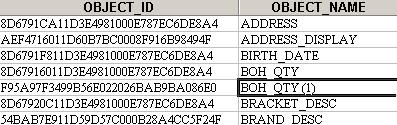
To confirm the issue is due to duplicate column objects, execute the following SQL statement against the metadata database:
SELECT OBJECT_ID, OBJECT_NAME FROM DSSMDOBJINFO WHERE OBJECT_TYPE =26 ORDER BY OBJECT_NAME
The OBJECT_NAME of the resulting column objects should be unique. If there is a column name with a number in parenthesis (as in the image below) then there are duplicate columns.
Please contact Strategy Technical Support for further assistance with this issue.
WORKAROUND:
To workaround this issue, continue to click until the message box disappears. In some environments, it was necessary to click 30 times or more before the message no longer returned. In most cases, users were then able to run the Warehouse Catalog successfully.
