EducationSoftwareStrategy.com
StrategyCommunity

Knowledge Base

Product

Community

Knowledge Base

TopicsBrowse ArticlesDeveloper Zone

Product

Download SoftwareProduct DocumentationSecurity Hub

Education

Tutorial VideosSolution GalleryEducation courses

Community

GuidelinesGrandmastersEvents
x_social-icon_white.svglinkedin_social-icon_white.svg
Strategy logoCommunity

© Strategy Inc. All Rights Reserved.

LegalTerms of UsePrivacy Policy
  1. Home
  2. Topics

KB9087: Executing jobs are cancelled even though the setting "Cancel this session's pending requests?" is set to "No" in MicroStrategy Web 9.x - 10.x


Community Admin

• Strategy


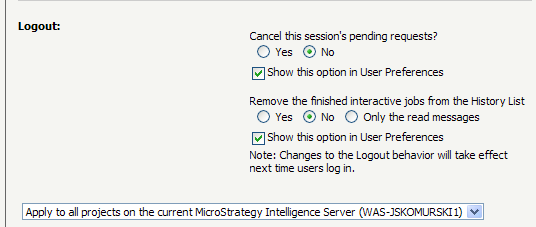
The "Cancel this session's pending requests?" and "Remove the finished interactive jobs from History List" Web preferences setting does not work as expected. When a user logs out, these setting will allow the jobs to continue to run despite the user being logged out.

SYMPTOM
The "Cancel this session's pending requests?" and "Remove the finished interactive jobs from History List" Web preferences setting does not work as expected. When a user logs out, these setting will allow the jobs to continue to run despite the user being logged out. The jobs cancel upon users log out of Strategy Web.
These settings are located at the project defaults level and the user level granted that the option is selected for "Show this option in User Preferences." They can be found in Strategy Web > Preferences > Project Defaults / User Preferences > Security.
 

ka04W000000OaVAQA0_0EM4400000029qQ.png

CAUSE
This behavior is working as designed. The running jobs will not be canceled if they are added to history list. If a job is not added into history list, the user cannot get the running result after logging out and re-logging in. When logging out, it is unnecessary to continue running the job. Therefore, logging out will trigger job cancellation. Only when the job is added into history list, the user can see the result after logging out and re-logging in.
ACTION
Add jobs to the History List. There are two ways to add a running job into history list:

  1. In Strategy Web under Preferences > Project defaults > History list, set "Add reports and documents to my history list" to Automatically.
  2. Running a report by clicking it and then click "Add to my History List".  

Article Reference Number: 
KB9087


Comment

0 comments

Details

Knowledge Article

Published:

April 14, 2017

Last Updated:

December 31, 2018