SYMPTOM:
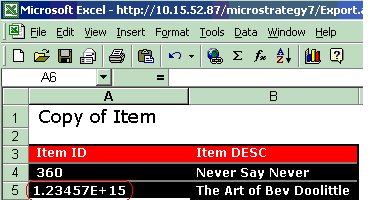
Users may notice that after exporting a report to Excel in Strategy Web 9.x, some or all of the attribute IDs are displayed in scientific notation. Additionally, the user may notice that this issue will only occur for attribute IDs greater than 11 digits long, as shown in the screenshot below:
CAUSE:
This issue occurs because Strategy Web 9.x will choose to format all of the cells for attribute IDs in Excel as the "General" cell format. Any number with more than 11 digits will be displayed in scientific notation in Excel.
ACTION:
There are two ways in which a user can resolve this issue:
