EducationSoftwareStrategy.com
StrategyCommunity

Knowledge Base

Product

Community

Knowledge Base

TopicsBrowse ArticlesDeveloper Zone

Product

Download SoftwareProduct DocumentationSecurity Hub

Education

Tutorial VideosSolution GalleryEducation courses

Community

GuidelinesGrandmastersEvents
x_social-icon_white.svglinkedin_social-icon_white.svg
Strategy logoCommunity

© Strategy Inc. All Rights Reserved.

LegalTerms of UsePrivacy Policy
  1. Home
  2. Topics

KB9106: What is the Function Plugin Wizard in MicroStrategy 9.x and how is it installed?


Community Admin

• Strategy


This technical note describes the Function Plugin Wizard, a utility utilized in MicroStrategy Desktop 9.x.

The Function Plugin Wizard is a utility that comes with the Strategy SDK and is utilized in Strategy Desktop 9.x. Once the utility has been installed, the Strategy Analytical Engine allows users to define their own collection of functions which the Strategy Analytical Engine can then use for further analysis.
These functions should behave as an integrated part of the product. Plug-in functions are indistinguishable from any other functions or operators, such as:
Sum, Average, Min, Max, Count, –, +, /, or *.The Strategy Analytical Engine can also perform standard computations, such as Sum, Average, +, /, etc., which are usually performed by the database.
The installation for this utility can be found in the following folder location:
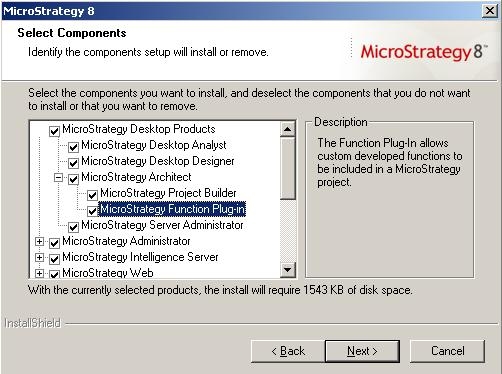
  • In Strategy 9.x, this utility has to be installed as a separate product during Strategy installation under Strategy Desktop Products > Strategy Architect > Strategy Function Plug-in.
ka04W000000ObcVQAS_0EM44000000294x.jpeg
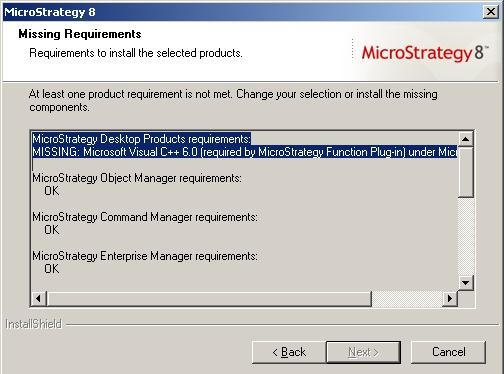
  • NOTE: In order to install Function Plug-in, Microsoft Visual C++ 6.0 has to be installed on the same machine. Installation will not proceed if this requirement is not fulfilled.
ka04W000000ObcVQAS_0EM44000000294v.jpeg

Strategy Desktop Products requirements: MISSING: Microsoft Visual C++ 6.0 (required by Strategy Function Plug-in) under Strategy Architect
Once this utility is installed, the user will be able to create custom functions.
For information on creating custom functions, refer to the following Strategy Knowledge Base document:
KB6100-724-0330 - How to create, add, modify and import a new function using the Function Plugin Wizard in Strategy SDK 9.x


Comment

0 comments

Details

Knowledge Article

Published:

May 23, 2017

Last Updated:

May 23, 2017