Even though Month ID information is stored differently in various user environments, this document will illustrate the general process and requirements when creating a Last Month Transformation.
It is important to note that the creation of a Last Month Transformation is different than the creation of a Last Year Transformation, as described in Strategy Knowledge Base document
KB4374 - Are Transformation tables needed to create transformation attributes/metrics in Strategy 9.4.x-10.x?
In the case of 'Year', it is possible to use an expression base Transformation such as Last Year = Year_ID - 1, because if a year ID is 2001, 2001 - 1 = 2000.
However, it is difficult to arrive at a logical expression for 'Last Month'. This is due to the way that the Month ID is stored in the warehouse. In the Strategy Tutorial Project, Month ID is stored as "yyyymm". For example, January 2001 is stored as "200101".
By using the expression Last Month = Month_ID - 1, if Month ID = 200101, then 200101 - 1 = 200100. As "00" does not correspond to a valid month, the expression would not work.
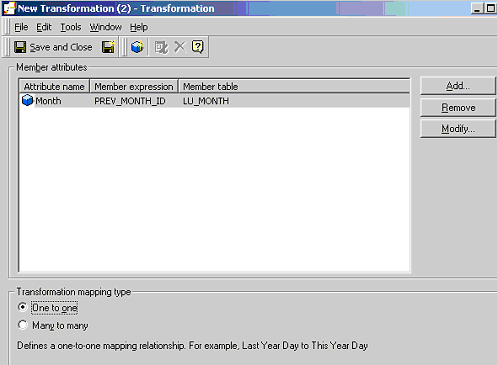
As such, in order to create a 'Last Month' transformation, it is necessary to use a table based transformation. To create a 'Last Month' Transformation, perform the following steps:
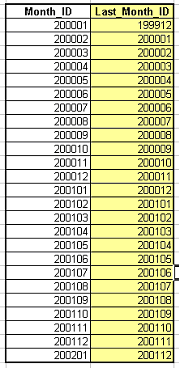
Now, perform the following steps to create the actual transformation:
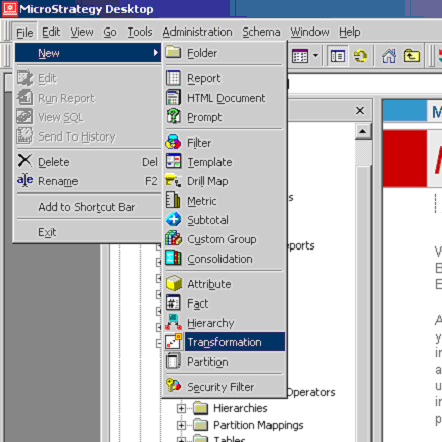
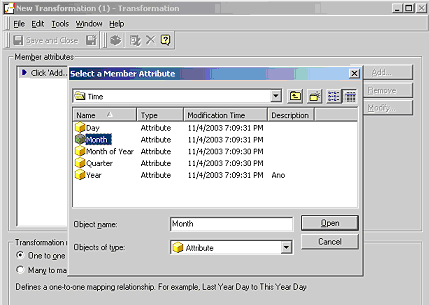
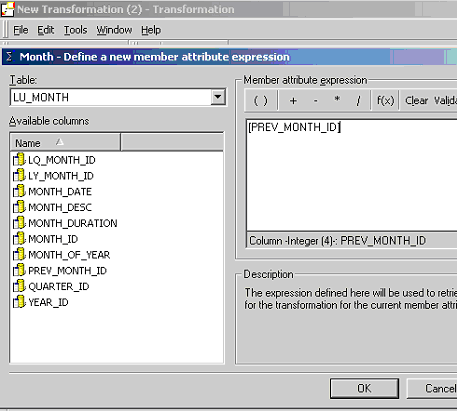
For details on how to use transformations to create transformation metrics, refer to Strategy Knowledge Base document
KB5603 - How to create and use transformation metrics in Strategy Developer 9.4.x-10.x?
