EducationSoftwareStrategy.com
StrategyCommunity

Knowledge Base

Product

Community

Knowledge Base

TopicsBrowse ArticlesDeveloper Zone

Product

Download SoftwareProduct DocumentationSecurity Hub

Education

Tutorial VideosSolution GalleryEducation courses

Community

GuidelinesGrandmastersEvents
x_social-icon_white.svglinkedin_social-icon_white.svg
Strategy logoCommunity

© Strategy Inc. All Rights Reserved.

LegalTerms of UsePrivacy Policy
  1. Home
  2. Topics

KB9250: How to remove "Total" as an option in a page-by when subtotals are enabled on a report in MicroStrategy Developer 10.x


Stefan Zepeda

Salesforce Solutions Architect • Strategy


This article describes how to remove "Total" as an option in a page-by when subtotals are enabled on a report in MicroStrategy Developer 10.x

This document describes how to remove "Total" as an option in a page-by when subtotals are enabled on a report in Strategy Developer 10.x
 
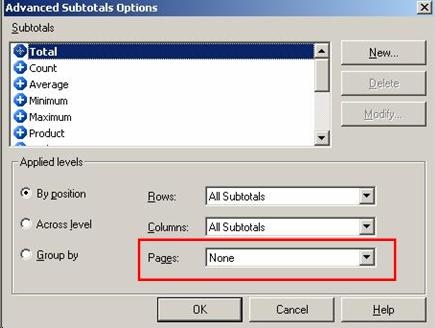
When subtotals are enabled on a Strategy Desktop report, attributes in a page-by are defaulted to display "Total" as the last option in the drop-down box. In Strategy 10.x users have the ability to disable this option. The setting to enable or disable "Total" in a page-by is located in the "Advanced Subtotals Options" dialog box.
 
Perform the following steps to turn off "Total" as an option in page-by:
 

  • Click on Data > Subtotals within the report menu options.
  • Click on the "Advanced…" button to get the "Advanced Subtotals Options" dialog box.
  • In the Subtotals window, highlight the word "Total".
  • In Applied Levels, ensure the radio button next to "By Position" is selected.
  • Click on the "Pages" drop-down box and select "None", as shown in the screen shot below:
ka02R000000kc2AQAQ_0EM440000002G2O.jpeg

Selecting this option will remove "Total" from the page-by.


Comment

0 comments

Details

Knowledge Article

Published:

June 1, 2017

Last Updated:

June 1, 2017