EducationSoftwareStrategy.com
StrategyCommunity

Knowledge Base

Product

Community

Knowledge Base

TopicsBrowse ArticlesDeveloper Zone

Product

Download SoftwareProduct DocumentationSecurity Hub

Education

Tutorial VideosSolution GalleryEducation courses

Community

GuidelinesGrandmastersEvents
x_social-icon_white.svglinkedin_social-icon_white.svg
Strategy logoCommunity

© Strategy Inc. All Rights Reserved.

LegalTerms of UsePrivacy Policy
  1. Home
  2. Topics

KB9255: Report execution fails with error message "Error: The user does not have Execute access to this Filter object (ID is 'XXX'). Error in Process method of Component: ResolutionServer, Project 1, Job 1111, Error Code= -2147214570."


Community Admin

• Strategy


Report execution fails with the following error message: Error: The user does not have Execute access to this Filter object (ID is 'XXX'). Error in Process method of Component: ResolutionServer, Project 1, Job 1111, Error Code= -2147214570. Reports with the objects that have been created inside each user's "My Personal Objects" folder cannot be executed by anyone other than the owner even after moving the report into the "Public Folder."

SYMPTOM:
Report execution fails with the following error message:
 
Error: The user does not have Execute access to this Filter object (ID is 'XXX'). Error in Process method of Component: ResolutionServer, Project 1, Job 1111, Error Code= -2147214570.
Reports with the objects that have been created inside each user's "My Personal Objects" folder cannot be executed by anyone other than the owner even after moving the report into the "Public Folder."
 
CAUSE:
By default, the objects created inside the "My Personal Objects" folder have an Access Control List (ACL) for only the owner:
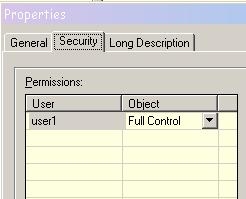
 

ka04W000000Ogt2QAC_0EM440000002G0X.jpeg

 
ACTION:
To resolve this issue, add "Everyone" or the appropriate user/user group to give at least the View permissions to all of the objects used in the report, as illustrated below:
 

ka04W000000Ogt2QAC_0EM440000002G0V.jpeg


Comment

0 comments

Details

Knowledge Article

Published:

June 8, 2017

Last Updated:

June 8, 2017