INTRODUCTION
In some circumstances, it is desired that date filters or other representations of dates in Structured Query Language (SQL) use a timestamp rather than a date format. Customizing the SQL in this case requires the user to expose a Very Large Database (VLDB) property that is normally hidden, called "TimeStamp Pattern".
The following example uses SQL Server for the warehouse but the procedure described here will apply to other database configuration.
Using a SQL Server warehouse, a report filter using a simple prompt on date yields the following SQL:
select a11.Date_ID Date_ID,
a11.Date_Desc Date_Desc
from LU_Time a11
where a11.Date_ID = CONVERT(datetime, '2003-10-15 00:00:00', 120)
To change the details of the CONVERT function call, the timestamp pattern must be changed. To achieve this, perform the following steps:
Now, the next time the user accesses VLDB properties at the database instance level, the Select/Insert folder will have an additional item, "SQL Timestamp Pattern", as shown below:
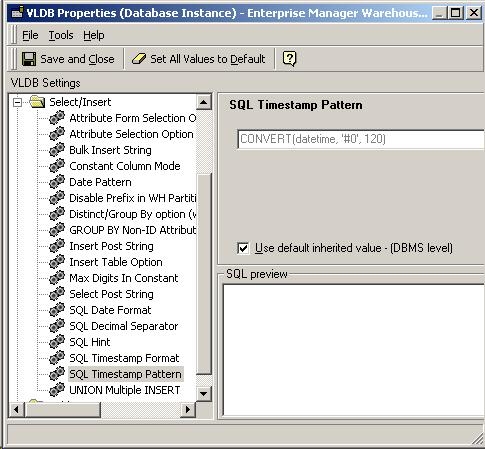
In the case of the example above, changing the timestamp pattern from convert(datetime, '#0', 120) to convert(datetime, '#0') results in the following SQL:
select a11.Date_ID Date_ID,
a11.Date_Desc Date_Desc
from LU_Time a11
where a11.Date_ID = CONVERT(datetime, '2003-10-15 00:00:00')
WARNING:
Manually editing values in the Strategy XML configuration files incorrectly may cause serious, project-wide problems that may make your project unusable. Since these are user-initiated changes, they are not covered by any Strategy warranty. Users are strongly encouraged to back up any XML files prior to any alteration.
