Report cost is an arbitrary value that can be assigned to a report to help determine its priority in relation to other requests. Higher numbers indicate a "heavy" report, or one that is large or exerts a higher workload on the data warehouse. Lower numbers indicate a lighter report. Heavy reports have a low job priority, Medium reports have a medium job priority and Light reports have a high job priority.
Strategy Intelligence Server Project Administrator can set a number of different entries in Job Prioritization, as shown below:
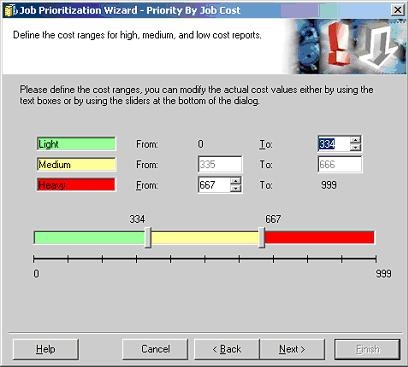
The default cost for a report is 0, which means the report is of high priority. A report's cost can be found by right-clicking individual report > Properties > Priority > Report Cost as seen below:

Note: Checking a report's cost is only possible in a 3-tier connection.
Since the report cost of 0 is of light weight (as shown in the report cost grouping earlier), it gets a job priority of High. To change the job priority of all new reports to low without manually changing each new report's job cost, in the final step of "Job Prioritization Wizard", simply change the priority as seen below:

The following window will then appear:

Notice that now the "Low" priority is with "Light" cost. When new reports are created (where the default cost is 0), they will automatically be assigned a Low job priority.
Note: By default, all jobs go to low priority. The above scenario is only applicable when users want to use job prioritization. In such a case, some jobs may be set to go to low priority and some to high and medium.
