This article assumes that the user has read and is familiar with the "Adding text and data to a document" section of page 20 from the RSDOCS.PDF. Additionally, this article make references to documents in the Strategy Tutorial project found in "Strategy Tutorial/Public Objects/Reports/Enterprise Reporting Documents" of the Strategy Tutorial folder.
SYMPTOM:
For some attributes (as well as for custom groups or consolidations) placed as dynamic fields in a header section (Details header or group-by header), only one element of the attribute is seen in the resulting Report writing document.
CAUSE:
Placing a field in the group-by or detail header implies presenting aggregated data at the level of the group-by. While any metric field placed within a group-by header can be evaluated (since metrics are inherently associated with aggregation functions), the same argument does not apply for attributes, consolidations and custom groups. For the purpose of simplifying this document, only attribute fields will be discussed, but the same theory applies for custom group and consolidation dynamic data fields placed in the group-by header.
To illustrate this issue, create a simple document based on the "Inventory by Item" report in the Public Objects/Reports/Enterprise Reporting Documents/Inventory by Subcategory folder in the Strategy Tutorial project.
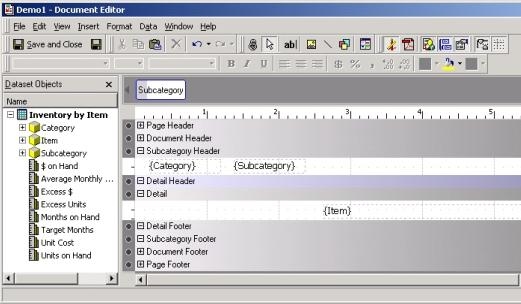
Place "Subcategory" in the group-by header, then in the "Subcategory" group-by section, place "Category", as shown below:

Note that "Category" has a logical 1:Many relationship with "Subcategory" defined in the schema.
Since there is only one "Category" for every "Subcategory", the Strategy Analytical Engine can correctly display the "Category" in the "Subcategory" group-by header. However, since there are many "Items" within a "Subcategory", placing "Item" in the "Subcategory" group-by would cause the Strategy Analytical Engine to pick only one "Item", as shown in the following screen shot:

This behavior is by design. To view all items within a "Subcategory", the "Item" attribute should be placed in one of the following locations:

ACTION:
When an attribute field is placed within a group-by header, the Strategy Analytical Engine must choose one attribute element since the group-by sections are inherently associated with aggregation. Consequently, for attribute fields, there is only a certain class of attributes that would logically make sense when the attribute is placed as a field within a group-by header. These are attributes for which the data in the details section of the joined datasets has a 1:Many or 1:1 relationship with the attribute placed in the group-by.
This relationship can occur through a combination of filters placed in the underlying datasets (located in the Sales and Inventory for Best Selling Products document in Strategy Tutorial) or when the specified attributes inherently have a 1:Many or 1:1 parent ("Category" field) - child ("Subcategory" group-by) relationship in the logical schema.
Attributes and other application objects that don't meet this criterion should be placed individually within a grid inside the group-by header so that all of the associated elements are correctly displayed in the group-by section.
Note that there is no such restriction for the details section and any attribute can be placed within it. For more information on this, refer to the "Inventory by Subcategory" document in Strategy Tutorial.
