Introduction
The Last() function returns the last value of the entire metric. However, the LastInRange() function returns the last value in the range from the first row to the current row in which the LastInRange() function is used. Consider the following examples:
Example 1
LastInRage() vs. Last()
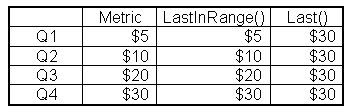
The LastInRange() function will pick the last value based on the current row. In the example below, the second row displays $10 as LastInRange() because $10 is the last value among $5 and $10:
Example 2
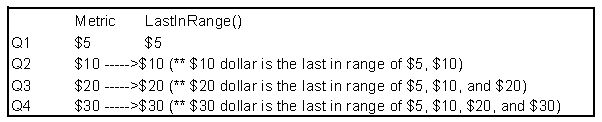
This indicates that the LastInRange() function displays the last value in range from the first row to the current row when it is applied. Thus, this is why this function always displays the same value as metric, as illustrated in Example 1, above.
However, the Last() function will pick the last value of the entire metric. Therefore, in Example 1, the Last() function displays $30 for all rows.
In the following example, the FirstInRange() function is used and the metrics are placed in descending order with $30 on top:
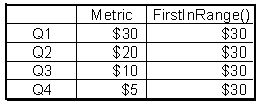
Since $30 is always the first value in the any range of the data, it will always display $30.
