EducationSoftwareStrategy.com
StrategyCommunity

Knowledge Base

Product

Community

Knowledge Base

TopicsBrowse ArticlesDeveloper Zone

Product

Download SoftwareProduct DocumentationSecurity Hub

Education

Tutorial VideosSolution GalleryEducation courses

Community

GuidelinesGrandmastersEvents
x_social-icon_white.svglinkedin_social-icon_white.svg
Strategy logoCommunity

© Strategy Inc. All Rights Reserved.

LegalTerms of UsePrivacy Policy
  1. Home
  2. Topics

KB9365: How to configure a DSN for the MicroStrategy ODBC Driver for DB2 Wire Protocol for connectivity to a DB2 UDB for Windows & Unix database


Community Admin

• Strategy


This document describes the process of configuring a Data Source Name (DSN) for the Strategy ODBC Driver for DB2 Wire Protocol, for connectivity to a DB2 UDB for Windows & Unix database.
 
The Strategy ODBC Driver for DB2 Wire Protocol is shipped with the Strategy 7i - 7.2.4 and Strategy 7.5.x releases. This driver is manufactured by DataDirect Technologies.
 
NOTE: Up until Strategy version 7.5.2, this driver is for evaluation purposes only. The version of the driver in Strategy 7.5.3 is 4.20.00.80.
 
The Strategy ODBC Driver for DB2 Wire Protocol does not require any DB2 client software for its functioning.
 
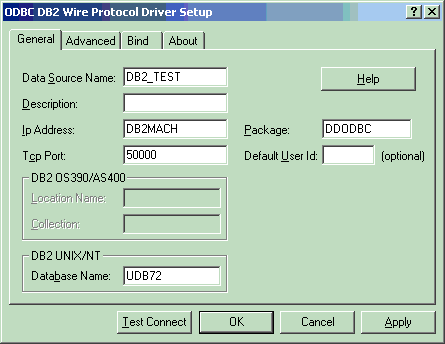
The DSN definition for the Strategy ODBC Driver for DB2 Wire Protocol (for connectivity to a DB2 UDB for Windows & Unix database), requires the following parameters, in the 'General' tab:
 

  • Data Source Name (DSN): Any name may be used.
  • Ip Address: The Ip Address or the name of the host machine on which the DB2 Server resides. If a host name is specified, the driver must find this name (with the correct address assignment) in the HOSTS file on the workstation or in a DSN server.
  • Tcp Port: The port number that is assigned to the DB2 DRDA listener process on the server host machine. Either this port's numeric address or its service name may be specified. If a service name is specified, the driver must find this name (with the correct port assignment) in the SERVICES file on the workstation.
  • Database Name: The name of the database to which the user wishes to connect.

The following screen shot shows an example DSN configuration for this driver. In this example, the host machine on which the DB2 server resides is called DB2MACH, the Tcp port number is 50000 and the database name is UDB72.
 

ka04W000000OcCQQA0_0EM440000002HYQ.gif

 
The remaining parameters in the 'General' tab, as well as the parameters in the 'Advanced' and 'Bind' tabs, are optional. The user may leave them at their default values.
 
Strategy recommends that users test the connection (by using the 'Test Connect' button at the bottom of the 'General' tab), to ensure the connection works well. Note that users are prompted for a User Name and Password before connecting.


Comment

0 comments

Details

Knowledge Article

Published:

May 16, 2017

Last Updated:

May 16, 2017