EducationSoftwareStrategy.com
StrategyCommunity

Knowledge Base

Product

Community

Knowledge Base

TopicsBrowse ArticlesDeveloper Zone

Product

Download SoftwareProduct DocumentationSecurity Hub

Education

Tutorial VideosSolution GalleryEducation courses

Community

GuidelinesGrandmastersEvents
x_social-icon_white.svglinkedin_social-icon_white.svg
Strategy logoCommunity

© Strategy Inc. All Rights Reserved.

LegalTerms of UsePrivacy Policy
  1. Home
  2. Topics

KB9379: How to create a truncated attribute description form from the standard long description in MicroStrategy Developer 10.x, when using an Oracle database


Stefan Zepeda

Salesforce Solutions Architect • Strategy


In some cases, users would like to see truncated description forms instead of the full descriptions. For example, in the MicroStrategy Tutorial project, for the 'Month' attribute, instead of seeing the description as 'September 2007, users might prefer to see 'Sep'.

In some cases, users would like to see truncated description forms instead of the full descriptions.
For example, in the Strategy Tutorial project, for the 'Month' attribute, instead of seeing the description as 'September 2007, users might prefer to see 'Sep'.
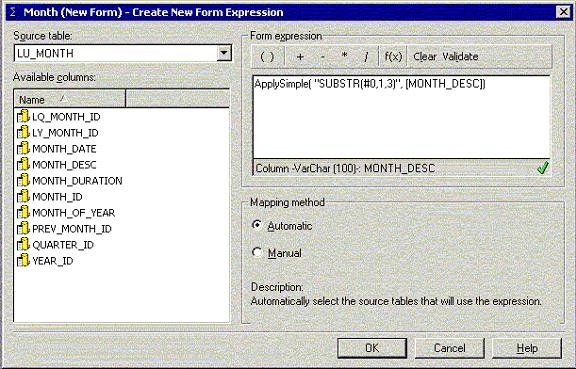
To achieve this, the users can make use of an Apply Simple statement through a new attribute form in the attribute form expression editor.
Apply Simple is the most commonly used Apply function; the output is the same object type as the input and it can be used in many different editors. In this case, the following syntax can be used:
ApplySimple("SUBSTR(#0,1,3)", )
Apply this syntax, as shown in the screen shot below:
ka02R000000kbkcQAA_0EM440000002G1U.jpeg

The Oracle function SUBSTR allows users to extract a substring from a string. The syntax for the substr function SUBSTR(A, B,C) trims a text variable A to C number of characters starting on the B-th character of the string.


Comment

0 comments

Details

Knowledge Article

Published:

June 9, 2017

Last Updated:

June 9, 2017