EducationSoftwareStrategy.com
StrategyCommunity

Knowledge Base

Product

Community

Knowledge Base

TopicsBrowse ArticlesDeveloper Zone

Product

Download SoftwareProduct DocumentationSecurity Hub

Education

Tutorial VideosSolution GalleryEducation courses

Community

GuidelinesGrandmastersEvents
x_social-icon_white.svglinkedin_social-icon_white.svg
Strategy logoCommunity

© Strategy Inc. All Rights Reserved.

LegalTerms of UsePrivacy Policy
  1. Home
  2. Topics

KB9389: How to use Conditions with Compound Metrics in MicroStrategy 9.4.x-10.x


Community Admin

• Strategy


This document demonstrates how to use conditions with compound metrics by creating another metric that is not technically defined as a compound metric which then permits conditions.

Strategy 9.4.x-10.x does not allow for conditions in compound metrics. However, this document demonstrates how to use conditions with compound metrics by creating another metric that is not technically defined as a compound metric which then permits conditions.
 
To achieve this, perform the following step using the Strategy Tutorial project:
  • Create a compound metric that is defined as metrics Profit + Revenue and name it "Profit + Revenue Compound Metric".
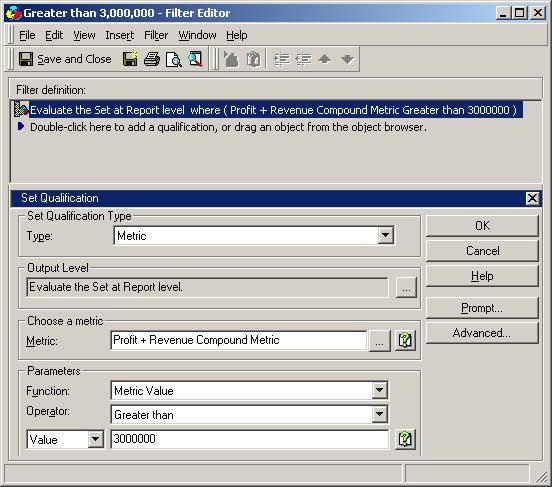
  • Create a filter that filters the metric value of "Profit + Revenue Compound Metric" that is greater than 3,000,000, as shown below:
ka04W000000OhjcQAC_0EM440000002G0d.jpeg
  •  
    Name this filter "Greater than 3,000,000".
     
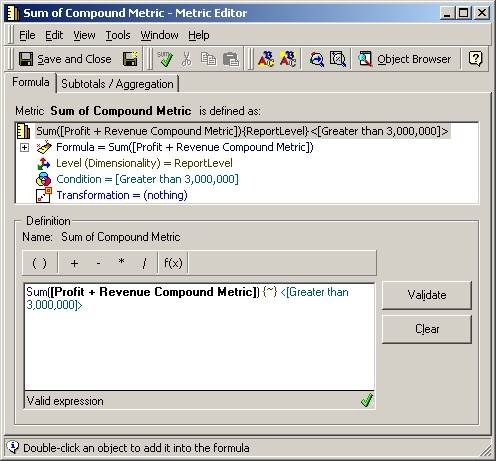
  • Create a new metric that is defined as the sum of "Profit + Revenue Compound Metric" with the filter "Greater than 3,000,000" as its condition, as shown in the screen shot below:
ka04W000000OhjcQAC_0EM440000002G0Y.jpeg
  •  
    Save the new metric as "Sum of Compound Metric".
     
  • Create a report that makes use of the metric created in the previous step, as shown in the following screen shot:
ka04W000000OhjcQAC_0EM440000002G0b.jpeg

Comment

0 comments

Details

Knowledge Article

Published:

April 18, 2017

Last Updated:

April 18, 2017