EducationSoftwareStrategy.com
StrategyCommunity

Knowledge Base

Product

Community

Knowledge Base

TopicsBrowse ArticlesDeveloper Zone

Product

Download SoftwareProduct DocumentationSecurity Hub

Education

Tutorial VideosSolution GalleryEducation courses

Community

GuidelinesGrandmastersEvents
x_social-icon_white.svglinkedin_social-icon_white.svg
Strategy logoCommunity

© Strategy Inc. All Rights Reserved.

LegalTerms of UsePrivacy Policy
  1. Home
  2. Topics

KB9391: How to create a derived metric in MicroStrategy Developer 9.4.x-10.x?


Stefan Zepeda

Salesforce Solutions Architect • Strategy


This knowledge base article explains how to create a derived metric in MicroStrategy Developer 9.4.x-10.x.

A derived metric is a metric that is bound only to its report. A derived metric makes use of components of the report definition as well as functions and operators, thus, avoiding the need to generate and re-execute Structured Query Language (SQL).
 
Note: Derived metrics require Strategy OLAP Services privileges.
 
The following procedure illustrates the creation of a simple derived metric in Strategy Developer 9.4.x-10.x:
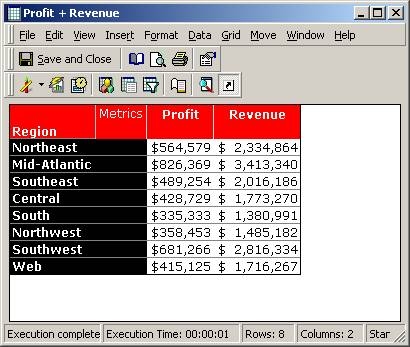
  • Create and execute a report similar to the following:
ka02R000000kbQ5QAI_0EM440000002G1q.jpeg
  • Select "New Metric…" under the "Insert" menu.
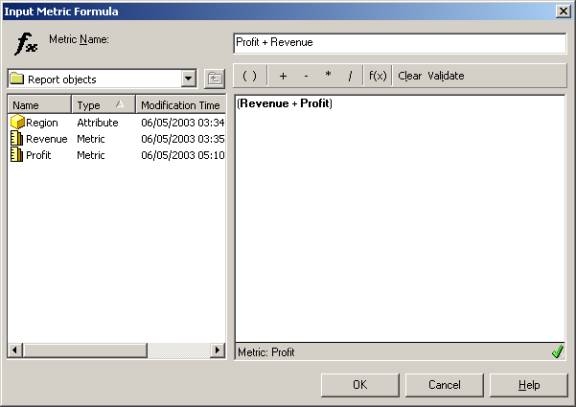
  • Input the metric formula.
ka02R000000kbQ5QAI_0EM440000002G1a.jpeg
  • Revenue + Profit
  • Click on the "Validate" button to validate the formula.
  • Name the derived metric using the top most text field in the window.
  • Select the "OK" button to insert the new metric into the report.
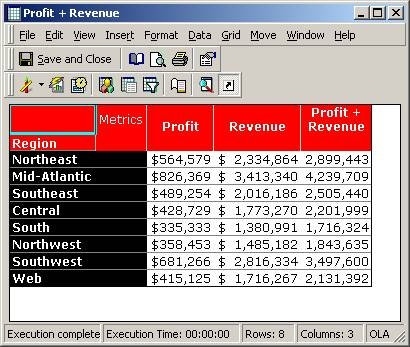
  • Place the new metric in the desired location, as shown in the screen shot below:
ka02R000000kbQ5QAI_0EM440000002G1s.jpeg


Comment

0 comments

Details

Knowledge Article

Published:

April 20, 2017

Last Updated:

June 26, 2017