EducationSoftwareStrategy.com
StrategyCommunity

Knowledge Base

Product

Community

Knowledge Base

TopicsBrowse ArticlesDeveloper Zone

Product

Download SoftwareProduct DocumentationSecurity Hub

Education

Tutorial VideosSolution GalleryEducation courses

Community

GuidelinesGrandmastersEvents
x_social-icon_white.svglinkedin_social-icon_white.svg
Strategy logoCommunity

© Strategy Inc. All Rights Reserved.

LegalTerms of UsePrivacy Policy
  1. Home
  2. Topics

KB9393: How to include quotes inside of quotes in MicroStrategy Command Manager 10.x


Community Admin

• Strategy


This Knowledge Base article describes how to include quotes inside of quotes in MicroStrategy Command Manager 10.x

A break symbol is needed to let Strategy Command Manager know that it should treat quotes as text rather than syntax. For example, the break symbol would be used when sending a message to users that contains quotes as text.
An example of how these internal quotes work is provided in the following Strategy Command Manager command:


SEND MESSAGE "This message ignores ^"Quotes^"" TO USER "administrator";
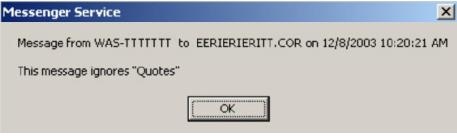
 

This command sends a message that contains quotes to the user "administrator", as shown in the screen shot below:
 

ka04W000000OfdmQAC_0EM440000002SXP.jpeg

 
26241


Comment

0 comments

Details

Knowledge Article

Published:

June 26, 2017

Last Updated:

May 24, 2018