EducationSoftwareStrategy.com
StrategyCommunity

Knowledge Base

Product

Community

Knowledge Base

TopicsBrowse ArticlesDeveloper Zone

Product

Download SoftwareProduct DocumentationSecurity Hub

Education

Tutorial VideosSolution GalleryEducation courses

Community

GuidelinesGrandmastersEvents
x_social-icon_white.svglinkedin_social-icon_white.svg
Strategy logoCommunity

© Strategy Inc. All Rights Reserved.

LegalTerms of UsePrivacy Policy
  1. Home
  2. Topics

KB9394: How to use Transformations with Compound Metrics in MicroStrategy Developer 10.x


Stefan Zepeda

Salesforce Solutions Architect • Strategy


Strategy Developer 10.x, by design, excludes Level, Condition and Transformation definitions from compound metrics, therefore, precluding the use of transformations in compound metrics. However, this document demonstrates how to use transformations with compound metrics by creating another metric that is not technically defined as a compound metric.
 
The following procedure uses the Strategy Tutorial project to illustrate how to achieve this:
 

  • Create a compound metric that is defined as 'Profit' + 'Revenue' and name it "Profit + Revenue Compound Metric".
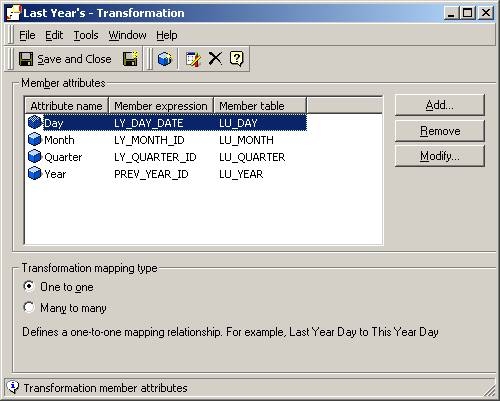
  • Create a transformation that represents (dynamically) the last year, as shown in the figure below:
ka02R000000kbxSQAQ_0EM440000002G12.jpeg
  •  
    Save this as "Last Year's".
     
    Note: This Transformation comes pre-installed with Strategy Tutorial.
     
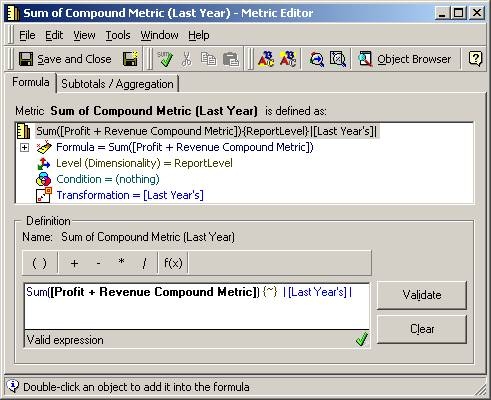
  • Create a new metric that is defined as the sum of "Profit + Revenue Compound Metric" with the transformation "Last Year's" as its transformation, as shown in the screen shot below:
ka02R000000kbxSQAQ_0EM440000002G10.jpeg
  •  
    Sum(){~}
  • Save the new metric as "Sum of Compound Metric (Last Year)".
     
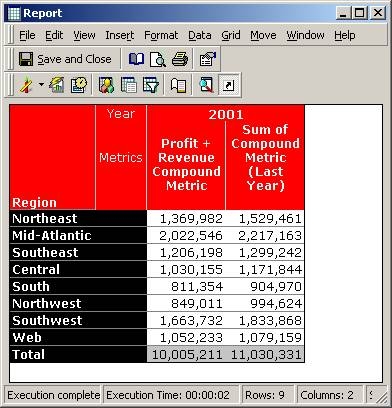
  • Create a report that makes use of the metric created in the previous step, as shown below:
ka02R000000kbxSQAQ_0EM440000002G13.jpeg

Comment

0 comments

Details

Knowledge Article

Published:

June 5, 2017

Last Updated:

June 5, 2017