In the Strategy SQL Engine 9.x, when the same filter conditions must be applied to multiple passes, the same where clause appears in each of these passes.
For example, the following report is created using the Strategy Tutorial project:
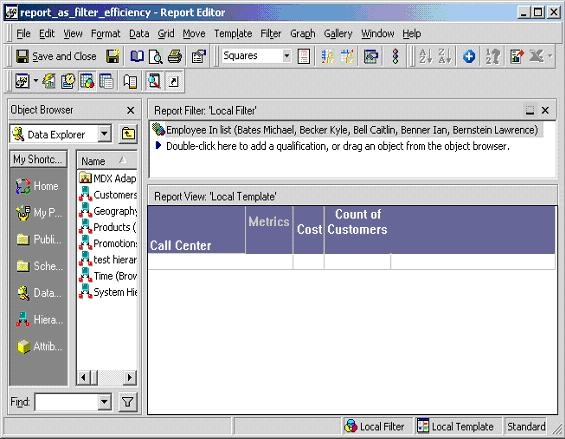
Generated Structured Query Language (SQL) includes the filter condition about employees in two metric resolution passes, as illustrated below:
create table ZZMD00 ( CALL_CTR_ID BYTE, WJXBFS1 DOUBLE)
insert into ZZMD00
select a12. AS CALL_CTR_ID,
sum(a11.) AS WJXBFS1
from a11,
a12
where a11. = a12.
and a11. in (1, 2, 3, 4, 5)
group by a12.
create table ZZMD01 ( CALL_CTR_ID BYTE, WJXBFS1 LONG)
insert into ZZMD01
select a12. AS CALL_CTR_ID,
count(a11.) AS WJXBFS1
from a11, a12
where a12. in (1, 2, 3, 4, 5)
group by a12.
select pa1. AS CALL_CTR_ID,
a11. AS CENTER_NAME,
a11. AS REGION_ID,
pa1. AS WJXBFS1,
pa2. AS WJXBFS2
from pa1, pa2, a11
where pa1. = pa2. and pa1. = a11.
drop table ZZMD00
drop table ZZMD01
This redundant where clause can be expensive if the filter conditions are complicated and thus involve many tables and joins. Ideally, an intermediate table populated with entries could be created to satisfy the complicated filter conditions so that the rest of the SQL statements can use that intermediate table. In that case, the where clause would be executed only once instead of multiple times and SQL performance would be improved.
WORKAROUND:
Using report-as-filter can achieve the above mentioned purpose. Report-as-filter is always applied as an intermediate table and that table is usually created in the first pass. The rest of the SQL statements can use that table whenever necessary. For the example discussed above, perform the following:
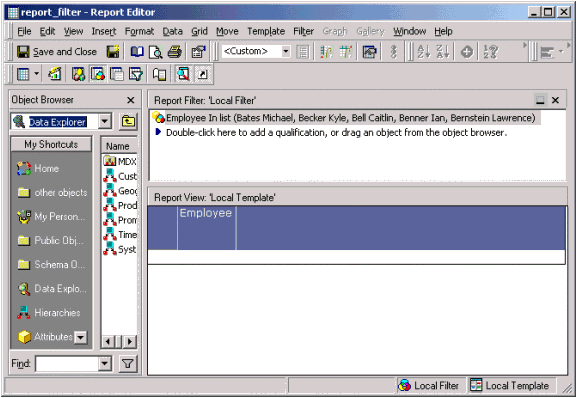
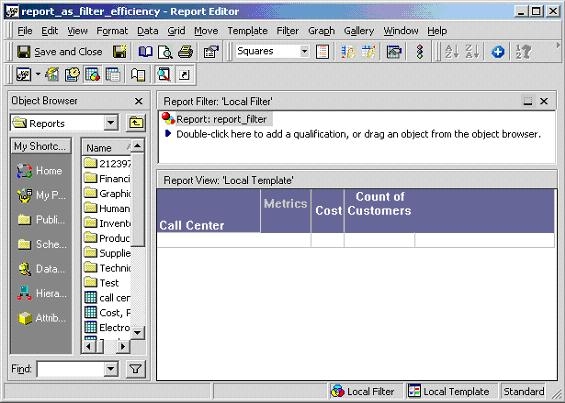
As expected, the SQL statement for the modified report includes only one where clause and the redundant clause is eliminated, as illustrated in the SQL below:
create table ZZMQ00 ( EMP_ID BYTE)
insert into ZZMQ00
select a11. AS EMP_ID
from a11
where a11. in (1, 2, 3, 4, 5)
create table ZZMD01 ( CALL_CTR_ID BYTE, WJXBFS1 DOUBLE)
insert into ZZMD01
select a12. AS CALL_CTR_ID,
sum(a11.) AS WJXBFS1
from a11,
pa1,
a12
where a11. = pa1. and
a11. = a12.
group by a12.
create table ZZMD02 ( CALL_CTR_ID BYTE, WJXBFS1 LONG)
insert into ZZMD02
select a12. AS CALL_CTR_ID,
count(a11.) AS WJXBFS1
from a11,
pa1,
a12
where pa1. = a12.
group by a12.
select pa2. AS CALL_CTR_ID,
a11. AS CENTER_NAME,
pa2. AS WJXBFS1,
pa3. AS WJXBFS2
from pa2, pa3, a11
where pa2. = pa3. and pa2. = a11.
drop table ZZMQ00
drop table ZZMD01
drop table ZZMD02
