EducationSoftwareStrategy.com
StrategyCommunity

Knowledge Base

Product

Community

Knowledge Base

TopicsBrowse ArticlesDeveloper Zone

Product

Download SoftwareProduct DocumentationSecurity Hub

Education

Tutorial VideosSolution GalleryEducation courses

Community

GuidelinesGrandmastersEvents
x_social-icon_white.svglinkedin_social-icon_white.svg
Strategy logoCommunity

© Strategy Inc. All Rights Reserved.

LegalTerms of UsePrivacy Policy
  1. Home
  2. Topics

KB9478: “The specified column name is invalid. Column names greater than 16 characters, which might not be supported by some databases", warning message appears when a metric name is more than 16 characters and is used as a column alias in MicroStrategy


Community Admin

• Strategy


“The specified column name is invalid. Column names greater than 16 characters, which might not be supported by some databases", warning message appears when a metric name is more than 16 characters and is used as a column alias in MicroStrategy 9.x and 10.x

SYMPTOM:
 
Users receive the following warning message when a Metric Column Alias longer than 16 characters is used:
 
The specified column name is invalid. Column names greater than 16 characters, which might not be supported by some databases.
 
CAUSE:
 
Most databases do not support more than 16 characters in a column alias. Metric names of 16 or more characters may be used by default as a column alias if the project level VLDB setting "Default to Metric Name" is set to "Use the metric name as the default metric column alias".
 
Strategy SQL Engine will generate the column alias as the metric name as seen in the SQL below:
select sum(a11.) AS abcdefghijklmnopqrstuvwxyz
from a11
 
ACTION:
Perform one of the following two actions to resolve this issue:
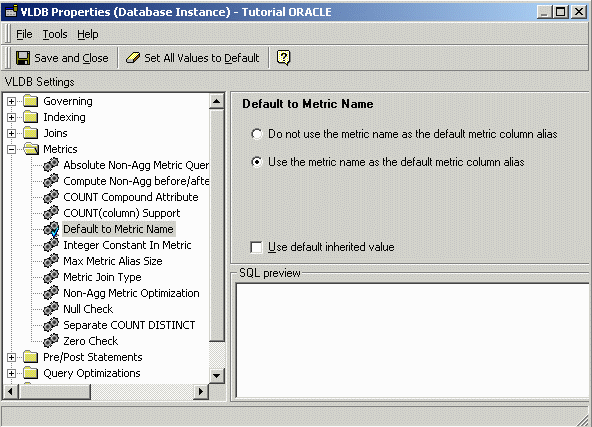
 

  • Select "Do not use the metric name as the default metric column alias" in "Default to Metric Name" VLDB setting at the Project level, as shown below:
ka04W000000Of1iQAC_0EM440000002BsC.gif
  •  
    Strategy SQL Engine will generate the WJXBFS# alias instead of using the long metric name as seen in the SQL below:
    select sum(a11.) AS WJXBFS1
    from a11
  • Use a column alias shorter than 16 characters for the metric name. The limit is 16 characters for a column alias in the Metric Column Options. To make this change in the metric editor, go to Tools > Advanced Setting > Metric column Options, as shown below:
ka04W000000Of1iQAC_0EM440000002Bs7.jpeg
  •  
    Enter the new column alias containing less than 16 characters:
     
ka04W000000Of1iQAC_0EM440000002BsA.jpeg
  •  
    Strategy SQL Engine will generate the column alias specified above as seen in the SQL below:
    select sum(a11.) AS metric_col_alias
    from a11
  • Note: The VLDB setting "Default to Metric Name" is only available at the Database Instance level.


Comment

0 comments

Details

Knowledge Article

Published:

June 15, 2017

Last Updated:

June 15, 2017