EducationSoftwareStrategy.com
StrategyCommunity

Knowledge Base

Product

Community

Knowledge Base

TopicsBrowse ArticlesDeveloper Zone

Product

Download SoftwareProduct DocumentationSecurity Hub

Education

Tutorial VideosSolution GalleryEducation courses

Community

GuidelinesGrandmastersEvents
x_social-icon_white.svglinkedin_social-icon_white.svg
Strategy logoCommunity

© Strategy Inc. All Rights Reserved.

LegalTerms of UsePrivacy Policy
  1. Home
  2. Topics

KB9480: How to generate a list of users whose account status is 'Enabled' or 'Disabled' using MicroStrategy Command Manager?


Community Admin

• Strategy


How to generate a list of users whose account status is 'Enabled' or 'Disabled' using MicroStrategy Command Manager?

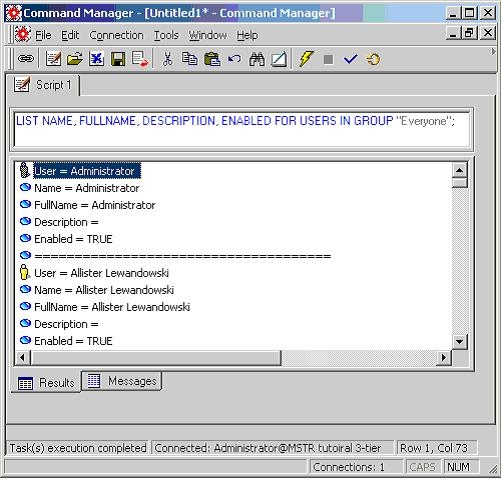
Using Strategy Administrator - Command Manager, the following script can be executed to obtain the ENABLED properties of Strategy users.
 
LIST NAME, FULLNAME, DESCRIPTION, ENABLED FOR USERS IN GROUP "Everyone";
ka04W000000Ogu0QAC_0EM440000002Bs9.jpeg

 
The output can be exported to a file for further processing such as to filter out users that have the ENABLED property set to TRUE.
 
Refer to the following Strategy Knowledge Base document for details on how to use the Strategy Command Manager interface:
 

  • KB6600-071-0002 - How to use the Strategy Command Manager interface

Note:
The above can also be used as a workaround for Strategy Administrator - Enterprise Manager. Currently, a report cannot be created to display the ENABLED property for user because this information is not collected.
 
This is a known issue in all versions of Strategy Enterprise Manager. Contact Strategy Technical Support for an update on this issue.


Comment

0 comments

Details

Knowledge Article

Published:

June 8, 2017

Last Updated:

June 8, 2017