EducationSoftwareStrategy.com
StrategyCommunity

Knowledge Base

Product

Community

Knowledge Base

TopicsBrowse ArticlesDeveloper Zone

Product

Download SoftwareProduct DocumentationSecurity Hub

Education

Tutorial VideosSolution GalleryEducation courses

Community

GuidelinesGrandmastersEvents
x_social-icon_white.svglinkedin_social-icon_white.svg
Strategy logoCommunity

© Strategy Inc. All Rights Reserved.

LegalTerms of UsePrivacy Policy
  1. Home
  2. Topics

KB9516: How to restrict the drilling options available from the lowest-level attribute in a hierarchy in MicroStrategy Developer and Web 9.x


Stefan Zepeda

Salesforce Solutions Architect • Strategy


How to restrict the drilling options available from the lowest-level attribute in a hierarchy in MicroStrategy Developer and Web 9.x

When drilling down through successive attributes in a drilling hierarchy, Strategy Developer and Web 9.x users may find that if they attempt to drill down from the lowest-level attribute, the default behavior is to drill up to the parent attribute. Users may find this counter-intuitive, as they might expect a message informing them that the attempted drill is not possible.
 
This behavior can be reproduced in the Strategy Tutorial project as follows:
 

  1. Create a simple report in the Tutorial project in 2-tier mode with 'Country' on the rows and 'Units Sold' on the columns.
  2. Edit the report drill map so as to include 'Region,' 'Call Center' and 'Employee' in the Drill Down and set all three to High priority.
  3. Execute the report.
  4. Carry out successive drill downs in the hierarchy by double-clicking on 'Country' and then on successive child attributes.
  5. Double-click on 'Employee' and notice that rather than a message indicating that no default drill path is specified, it drills back up to 'Call Center.'

Although this example is somewhat artificial, it is possible that users' drill mapping may give rise to essentially the same situation.
 
In this case, the product is doing exactly what is instructed. The drill map specifies that drilling downward should be possible for the lowest-level attribute in the hierarchy, so Strategy Developer or Web 9.x must drill to some attribute. Since it is impossible to go further down the hierarchy, the parent attribute is chosen as a fallback position.
 
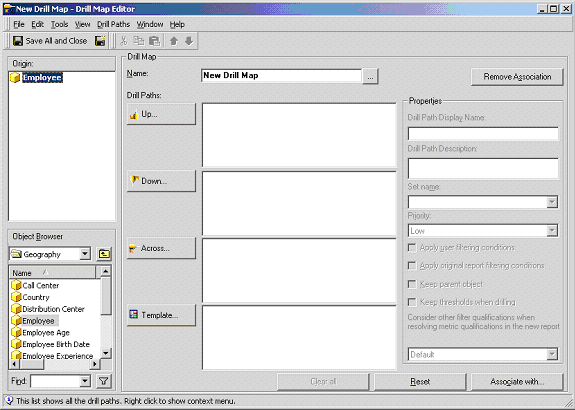
In order to resolve this issue at a project-wide level, the administrator should modify the drill path for the lowest-level attribute (in this case 'Employee') so that no target attributes are present in the "Drill Down" section.
 
The behavior may be further restricted by associating an empty drill map with the lowest-level attribute. "Empty," in this case, means a drill map with no objects in the Down, Up or Across field of the Drill Map Editor, as shown below:
ka02R000000kWMAQA2_0EM440000002Us9.gif

 
Users will now be prevented from drilling in any direction from 'Employee.'


Comment

0 comments

Details

Knowledge Article

Published:

July 18, 2017

Last Updated:

July 18, 2017