EducationSoftwareStrategy.com
StrategyCommunity

Knowledge Base

Product

Community

Knowledge Base

TopicsBrowse ArticlesDeveloper Zone

Product

Download SoftwareProduct DocumentationSecurity Hub

Education

Tutorial VideosSolution GalleryEducation courses

Community

GuidelinesGrandmastersEvents
x_social-icon_white.svglinkedin_social-icon_white.svg
Strategy logoCommunity

© Strategy Inc. All Rights Reserved.

LegalTerms of UsePrivacy Policy
  1. Home
  2. Topics

KB9546: Report subscriptions in MicroStrategy Web via the ‘Send Now’ and ‘Scheduled E-mail’ options using PDF format result in the report being sent in Portrait orientation.


Community Admin

• Strategy


In MicroStrategy Web a user configures the PDF settings (in Preferences > User Preferences > PDF) to export to PDF in Landscape orientation. The user then subscribes to a report via 'Send Now' or 'Scheduled E-mail' and selects the PDF format. However, when the email arrives containing the report, it appears in Portrait orientation.

SYMPTOM:
In Strategy Web a user configures the PDF settings (in Preferences > User Preferences > PDF) to export to PDF in Landscape orientation. The user then subscribes to a report via 'Send Now' or 'Scheduled E-mail' and selects the PDF format. However, when the email arrives containing the report, it appears in Portrait orientation.
 
CAUSE:
The settings in Preferences > User Preferences > PDF do not apply to 'Send Now' and 'Scheduled E-mail'. This is a known issue with Strategy Web.
 
ACTION:
Contact Strategy Technical Support for an update on this issue.
 
WORKAROUNDS:
To workaround this issue, perform the following steps:
 

  1. In Strategy Developer, edit the report and go to Data > Export Options.
  2. Select 'PDF File' from the drop-down menu.
  3. Click on 'Advanced Options'.
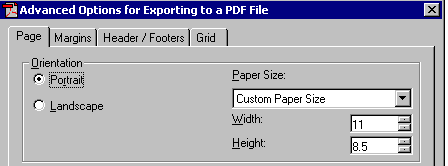
  4. Click on the 'Page' tab. In the 'Orientation' section, select 'Portrait'.
  5. Swap the values for the fields 'Height' and 'Width'.

The new values will appear as follows:
 

ka04W000000OeIYQA0_0EM440000002Bs5.gif

 
OR
 
Perform the following steps:
 

  1. In Strategy Developer, edit the report and go to Data > Export Options.
  2. Select 'PDF File' from the drop-down menu.
  3. Click on 'Advanced Options'.
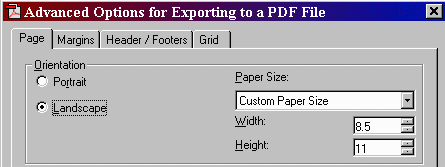
  4. Click on the 'Page' tab. In the 'Orientation' section, select 'Landscape'.
  5. Swap the values for the fields 'Height' and 'Width'.

The new values will appear as follows:
 

ka04W000000OeIYQA0_0EM440000002Bs2.gif


Comment

0 comments

Details

Knowledge Article

Published:

June 12, 2017

Last Updated:

June 12, 2017