The 'Update database statistics' option may be run as part of the data load process by enabling it through the Tools > Options > Data Load in the Enterprise Manager Console, as shown in the following screen shot:

The 'Update database statistics' option helps improve query performance on the database. These statistics are used by the database's optimizer while running Structured Query Language (SQL).
Running this data load option is not expected to take a long time. However, if the data load process is taking a long time or if the process is failing due to network errors, then the user may consider turning off the 'Update database statistics' option during the data load process. This can be done by un-checking the box, 'Update database statistics' in Tools > Options > Data Load > Optimization Options .
If needed, the 'Update database statistics' may be run stand-alone from Tools > Data Load Options in the Enterprise Manager Console, as illustrated below:
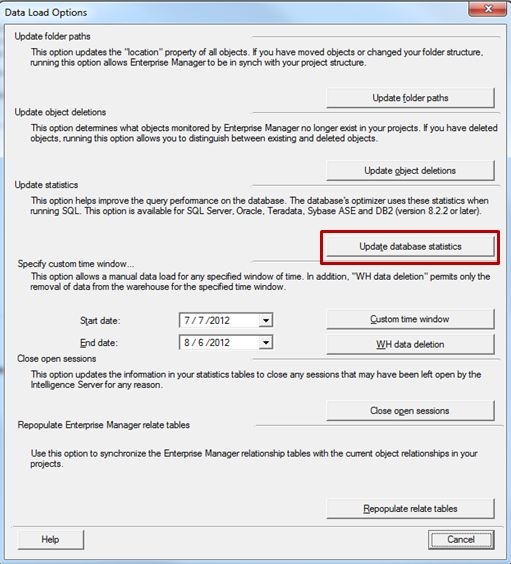
Note: Doing so will not interfere with the data load process.
Third Party Software Installation:
WARNING:
The third-party product(s) discussed in this technical note is manufactured by vendors independent of Strategy. Strategy makes no warranty, express, implied or otherwise, regarding this product, including its performance or reliability.
