INTRODUCTION:
In Strategy reports, users have the ability to control what can be displayed in place of NULL values. For example, when a report brings back a NULL from the warehouse, users can display the string "No Data" instead of having a blank appear on the report. These settings can be found under the Report Data Options menu, as illustrated below:

SYMPTOM:
In Strategy Report Services Documents, the NULL display settings are not reflected when using data fields to retrieve results.
Consider the following example to illustrate this issue. The following report has been configured with NULL Display settings. Notice that the Revenue result for Hazel Abelson is NULL in the warehouse and has been replaced with the string "Warehouse NULL":
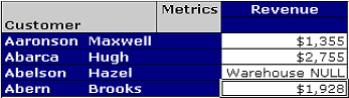
Next, the same report is used as a dataset in the Strategy Document Editor. The 'Customer' attribute and 'Revenue' metric have been placed onto the Document Layout area as a data field, as illustrated below:
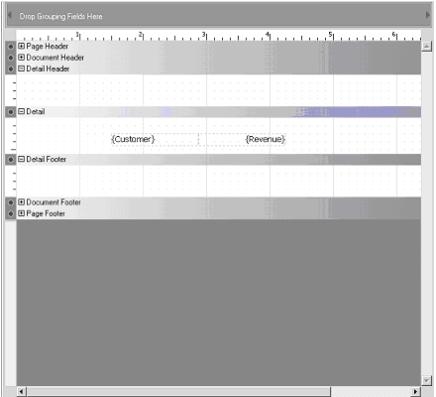
After the document is executed, notice that a blank appears under Revenue for Abelson:Hazel, instead of the string: "Warehouse NULL" .
CAUSE:
Settings in the Report Data Options are not reflected in Report Service Documents. Instead, settings are inherited at the Project Level, not the Report Level.
ACTION:
Change the Null display settings at the Project level. To do this, right-click on the Project and choose “Project Configuration.” Expand the “Report Definition” list and click on “Null Display.”
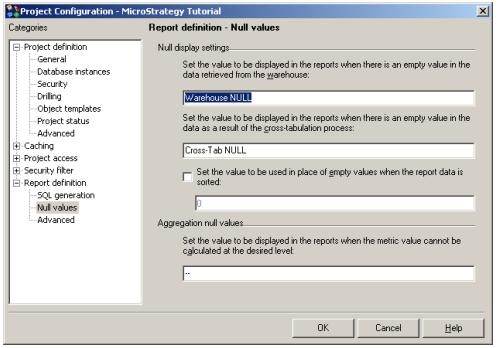
The values set in the Report Definition > Null Values window will now be reflected in the Report Service Document, as shown below:

