EducationSoftwareStrategy.com
StrategyCommunity

Knowledge Base

Product

Community

Knowledge Base

TopicsBrowse ArticlesDeveloper Zone

Product

Download SoftwareProduct DocumentationSecurity Hub

Education

Tutorial VideosSolution GalleryEducation courses

Community

GuidelinesGrandmastersEvents
x_social-icon_white.svglinkedin_social-icon_white.svg
Strategy logoCommunity

© Strategy Inc. All Rights Reserved.

LegalTerms of UsePrivacy Policy
  1. Home
  2. Topics

KB9601: How to set the default expiration date for new user accounts created through the MicroStrategy Narrowcast Server Subscription Portal


Community Admin

• Strategy


The article explains how to set the default expiration date for new users created in the MicroStrategy Narrowcast Server Subscription Portal

When new accounts are created from the Strategy Narrowcast Server Subscription Portal, they are assigned a default expiration date. The expiration date can be set automatically based on a set of preferences in the Portal Administrator.
 
The following procedure illustrates how to set the different expiration options for new accounts created from the Strategy Narrowcast Server Subscription Portal:
 

  • Open the Strategy Narrowcast Server Portal Administrator.
  • Navigate to the 'Preferences' section of the 'Site Preferences' page.
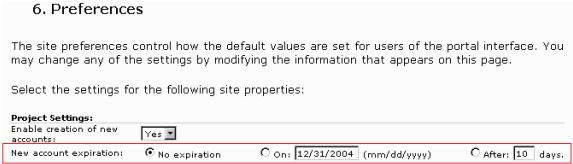
  • Locate the 'Project Settings' section, as shown below:
ka04W000000OgFRQA0_0EM440000002Brn.jpeg
  • Set the date when new users will expire by choosing from the following three choices of "New account expiration":
     
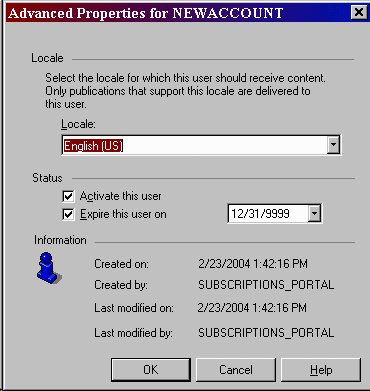
    • No expiration: This default setting does not set an expiration date on new user accounts. By design, accounts set to the 'No expiration' option are set to expire on 12/31/9999, as illustrated below:
ka04W000000OgFRQA0_0EM440000002Bro.gif
    • On (mm/dd/yyyy): Entering a date in this box indicates that all new user accounts terminate on the given date.
       
    • After (nn) days: Selecting this option and entering a valid number in this box will expire new user accounts after the given number of days following creation.
       
  • Note: These expirations have the same effect as expiring the user through the Strategy Narrowcast Administrator.
     

Comment

0 comments

Details

Knowledge Article

Published:

June 16, 2017

Last Updated:

June 16, 2017