EducationSoftwareStrategy.com
StrategyCommunity

Knowledge Base

Product

Community

Knowledge Base

TopicsBrowse ArticlesDeveloper Zone

Product

Download SoftwareProduct DocumentationSecurity Hub

Education

Tutorial VideosSolution GalleryEducation courses

Community

GuidelinesGrandmastersEvents
x_social-icon_white.svglinkedin_social-icon_white.svg
Strategy logoCommunity

© Strategy Inc. All Rights Reserved.

LegalTerms of UsePrivacy Policy
  1. Home
  2. Topics

KB9651: When opening up a MicroStrategy Office program, the MicroStrategy Intelligence Server name still appears as “localhost” even after the configuration was changed.


Community Admin

• Strategy


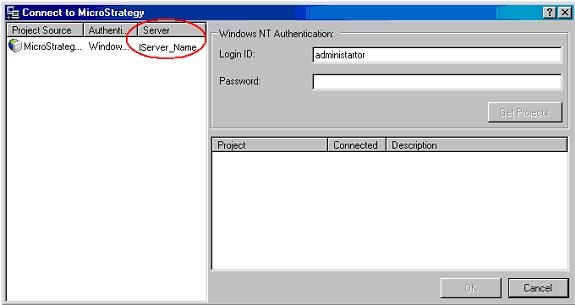
In a MicroStrategy Office program (such as Word), the connection window still displays the "localhost" server name even though the configuration was successfully changed to "IServer_Name

SYMPTOM:
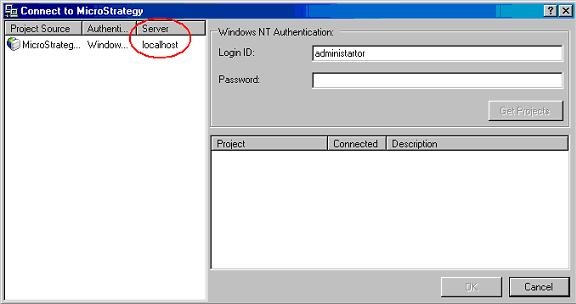
In a Strategy Office program (such as Word), the connection window still displays the "localhost" server name even though the configuration was successfully changed to "IServer_Name":
ka04W000000OhizQAC_0EM44000000293z.jpeg

 
CAUSE:
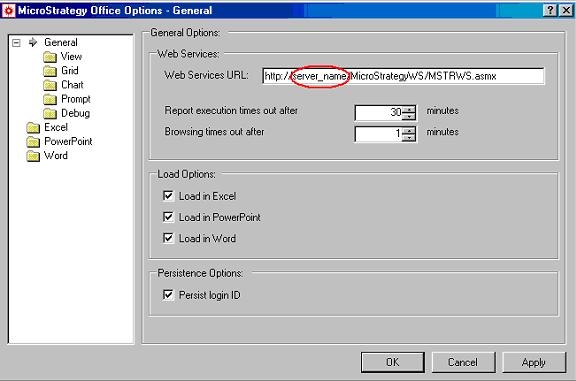
The configuration only changes the Strategy Web Server being used. The Strategy Intelligence Server is not modified and, therefore, still defaults to "localhost".
ka04W000000OhizQAC_0EM44000000293w.jpeg

 
ACTION:
To successfully change the Strategy Intelligence Server name, execute the following steps:
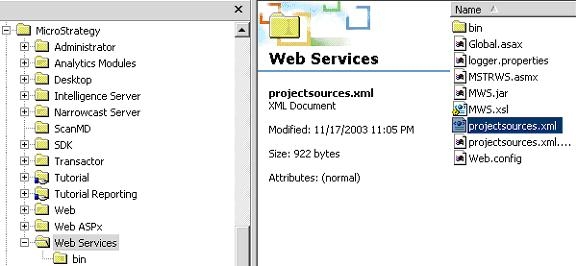

  • On the Strategy Web Server, go to Program Files > Strategy > Web Services > projectsources.xml and open it with notepad, as shown below:
ka04W000000OhizQAC_0EM44000000293x.jpeg
  • Locate the project source name that should be changed.
  • Change the "<Servername>" to the desired Strategy Intelligence Server and save the changes. In this example, the name is changed to "IServer_Name", as shown below:
ka04W000000OhizQAC_0EM44000000293y.jpeg
  • Open up Word in Strategy Office and the change will be reflected, as shown below:
ka04W000000OhizQAC_0EM440000002942.jpeg

Comment

0 comments

Details

Knowledge Article

Published:

April 18, 2017

Last Updated:

April 18, 2017