EducationSoftwareStrategy.com
StrategyCommunity

Knowledge Base

Product

Community

Knowledge Base

TopicsBrowse ArticlesDeveloper Zone

Product

Download SoftwareProduct DocumentationSecurity Hub

Education

Tutorial VideosSolution GalleryEducation courses

Community

GuidelinesGrandmastersEvents
x_social-icon_white.svglinkedin_social-icon_white.svg
Strategy logoCommunity

© Strategy Inc. All Rights Reserved.

LegalTerms of UsePrivacy Policy
  1. Home
  2. Topics

KB9688: How to create a custom subtotal using a custom expression in MicroStrategy Developer


Stefan Zepeda

Salesforce Solutions Architect • Strategy


How to create a custom subtotal using a custom expression in MicroStrategy Developer

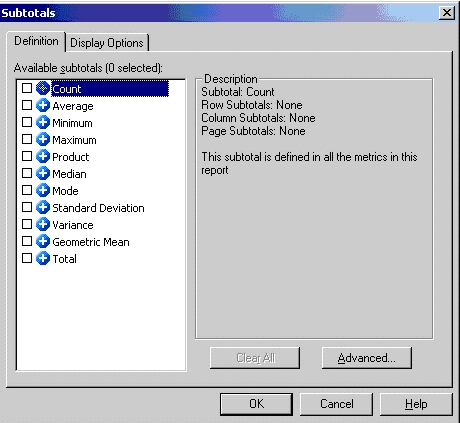
The following screen shot displays the default list of Subtotals in Strategy Developer:
ka0PW0000002xqPYAQ_0EM440000002FzF.gif

However, to create a new custom subtotal, perform the following steps:
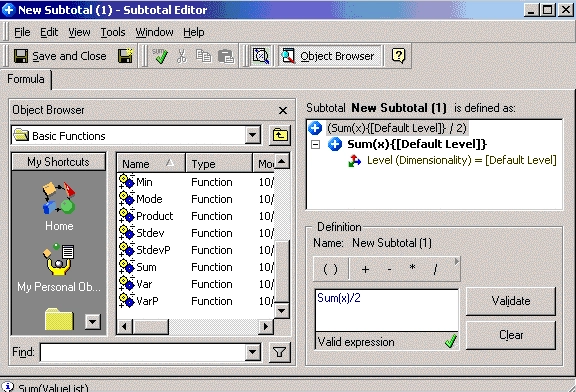
  • In Strategy Developer, right-click and select "New" > "Subtotal".
  • Using the functions in the "Basic Functions" folder in the drop-down box, create a custom subtotal in the Definition window, as shown below:
ka0PW0000002xqPYAQ_0EM440000002FzE.gif
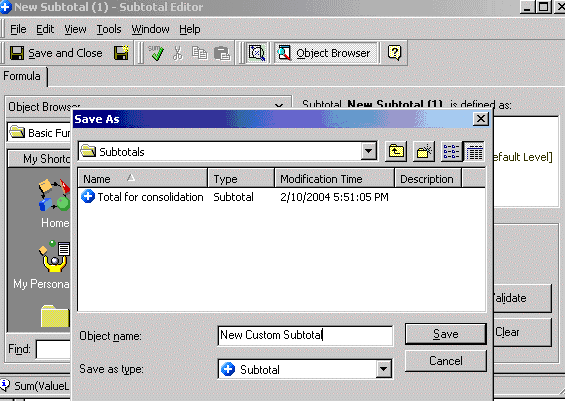
  • Save the new subtotal.
ka0PW0000002xqPYAQ_0EM440000002FzG.gif
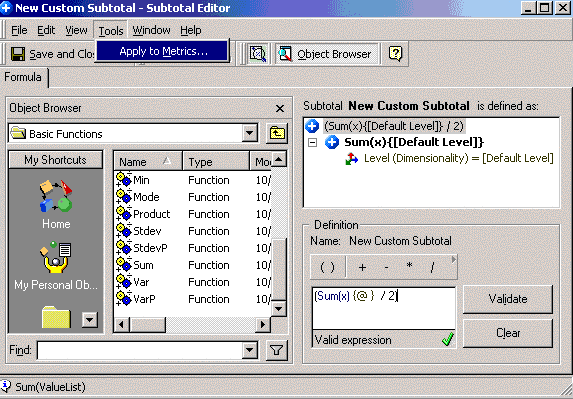
  • Go to "Tools" menu > "Apply to metric", as shown below:
ka0PW0000002xqPYAQ_0EM440000002Fz5.gif
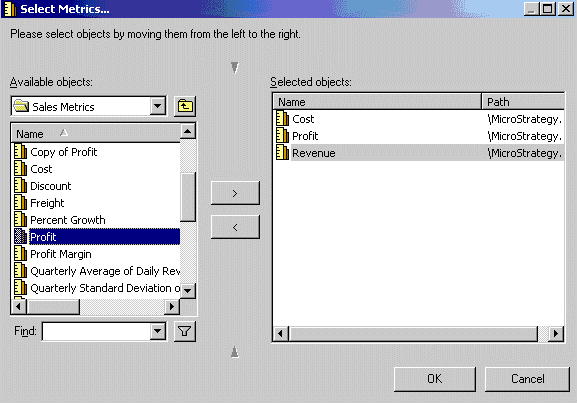
  • Select the metrics to apply to this subtotal and click OK:
ka0PW0000002xqPYAQ_0EM440000002Fz4.gif
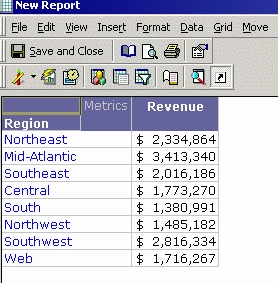
  • Create a new report with the metric which was selected in Step 5:
ka0PW0000002xqPYAQ_0EM440000002Fz3.gif
  • Navigate to "Data" menu > "Subtotals".

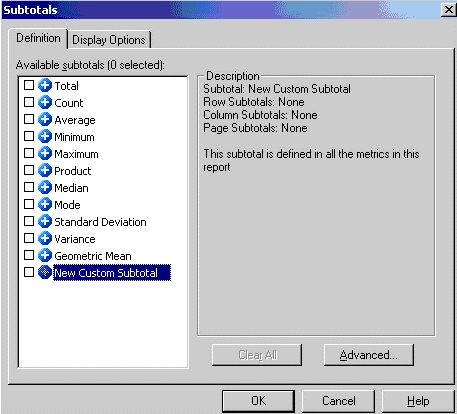
The Subtotals window will open and a new custom subtotal will appear in the available subtotals list, as illustrated below:
 

ka0PW0000002xqPYAQ_0EM440000002Fz6.gif

 
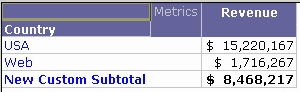
The report will now reflect the new custom subtotal, as shown in the following screen shot:
 

ka0PW0000002xqPYAQ_0EM440000002Fz9.gif

 
"New Custom Subtotal" is (total of revenue) / 2 = 8,468,217 as the definition of "New Custom Subtotal".


Comment

0 comments

Details

Knowledge Article

Published:

June 8, 2017

Last Updated:

August 12, 2024