Generally, when null checking is used in metrics, the null checking is performed as part of the initial metric calculation. This is true whether the null checking is written into the metric formula using the Strategy function NullToZero(My_Fact), or using a database pass-through function such as ApplySimple("NVL(#0, 0)", My_Fact) for Oracle.
Consider a report that uses the Strategy Tutorial project and includes the attribute 'Region' and the following metrics:
The Structured Query Language (SQL) generated is as follows:
select a12.REGION_ID REGION_ID,
ISNULL(sum(a11.TOT_DOLLAR_SALES), 0) WJXBFS1
into #ZZMD00
from CITY_CTR_SLS a11
join LU_CALL_CTR a12
on (a11.CALL_CTR_ID = a12.CALL_CTR_ID)
group by a12.REGION_ID
select a11.REGION_ID REGION_ID,
sum(a11.TOT_DOLLAR_SALES) WJXBFS1
into #ZZMD01
from STATE_REGION_MNTH_SLS a11
join LU_MONTH a12
on (a11.MONTH_ID = a12.MONTH_ID)
where a12.YEAR_ID in (2000)
group by a11.REGION_ID
select pa1.REGION_ID REGION_ID,
a11.REGION_NAME REGION_NAME,
pa1.WJXBFS1 WJXBFS1,
pa2.WJXBFS1 WJXBFS2
from #ZZMD00 pa1
join #ZZMD01 pa2
on (pa1.REGION_ID = pa2.REGION_ID)
join LU_REGION a11
on (pa1.REGION_ID = a11.REGION_ID)
In some cases, it may be necessary to preserve the null values throughout all intermediate pass calculations, only converting them to zeroes in the final pass. For display only, this can be accomplished using report data options. This does not actually change the nulls into zeroes (or some other value). Instead, it displays the existing null values using a different string.
However, circumstances exist where it may be necessary to convert the nulls into true zeroes in the final pass. For instance, metric values may be passed to a custom function for additional processing in the final pass. If that function does not accept nulls, changing the null display will not be sufficient.
To achieve this in Strategy SQL, perform the following:
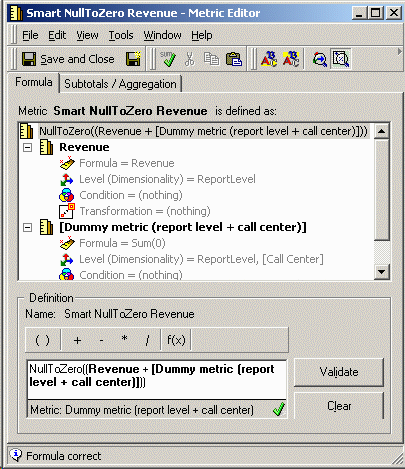
When a report using M3 is executed, the SQL will appear as follows:
select a12.REGION_ID REGION_ID,
sum(a11.TOT_DOLLAR_SALES) WJXBFS1
into #ZZMD00
from CITY_CTR_SLS a11
join LU_CALL_CTR a12
on (a11.CALL_CTR_ID = a12.CALL_CTR_ID)
group by a12.REGION_ID
select a11.REGION_ID REGION_ID,
sum(0.0) WJXBFS1
into #ZZMD01
from LU_REGION a11
group by a11.REGION_ID
select a11.REGION_ID REGION_ID,
sum(a11.TOT_DOLLAR_SALES) WJXBFS1
into #ZZMD02
from STATE_REGION_MNTH_SLS a11
join LU_MONTH a12
on (a11.MONTH_ID = a12.MONTH_ID)
where a12.YEAR_ID in (2000)
group by a11.REGION_ID
select pa1.REGION_ID REGION_ID,
a11.REGION_NAME REGION_NAME,
ISNULL((ISNULL(pa1.WJXBFS1, 0) + ISNULL(pa2.WJXBFS1, 0)), 0) WJXBFS1,
pa3.WJXBFS1 WJXBFS2
from #ZZMD00 pa1
join #ZZMD01 pa2
on (pa1.REGION_ID = pa2.REGION_ID)
join #ZZMD02 pa3
on (pa1.REGION_ID = pa3.REGION_ID)
join LU_REGION a11
on (pa1.REGION_ID = a11.REGION_ID)
Observe that no null checking is done in the first two passes (which represent the component metrics in M3, the smart compound metric). The ISNULL function is only produced in the final pass.
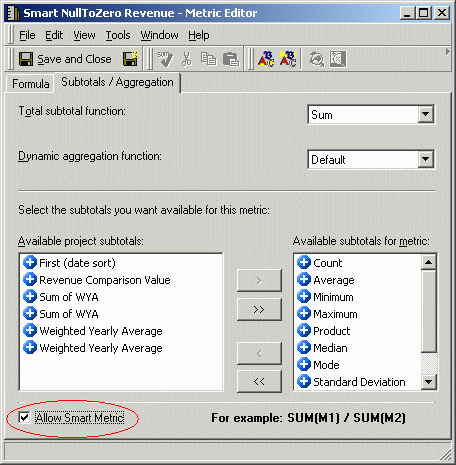
If this fails to retrieve the desired SQL, it may be necessary to enable smart metric calculation on M3, as shown below:
If it is desired, as in the scenario described above, to apply an additional function to the null-checked metric, this can be attained by creating another metric (M4) as My_Function(M3). M4 may also need to be configured as a smart metric.
