EducationSoftwareStrategy.com
StrategyCommunity

Knowledge Base

Product

Community

Knowledge Base

TopicsBrowse ArticlesDeveloper Zone

Product

Download SoftwareProduct DocumentationSecurity Hub

Education

Tutorial VideosSolution GalleryEducation courses

Community

GuidelinesGrandmastersEvents
x_social-icon_white.svglinkedin_social-icon_white.svg
Strategy logoCommunity

© Strategy Inc. All Rights Reserved.

LegalTerms of UsePrivacy Policy
  1. Home
  2. Topics

KB9694: How to run the MicroStrategy Metadata Update Utility against MicroStrategy 9.4.x projects and newer


Community Admin

• Strategy


The Metadata Update Utility (located in C:\Program Files(x86)\Common Files\Strategy\MDUpdateUtil.exe) is a utility responsible for updating the metadata with the latest project information based on the version of Strategy Desktop from the machine on which the utility is installed and executed. Some of the information that is included in the update includes property sets used to support new functionality that becomes available in versions of Strategy applications.
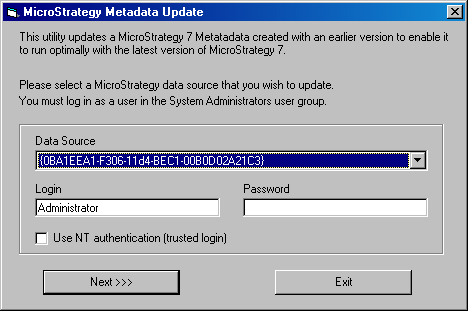
  • Once the utility is run, the following screen will appear:
ka04W000000OhPiQAK_0EM440000002JJM.jpeg
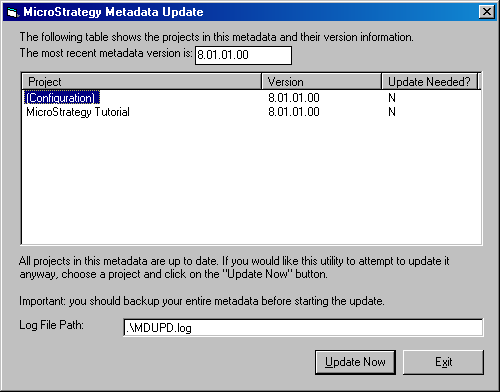
  • Once the project source and administrator login and password is chosen, click "Next >>>" and the following screen shot will appear:
ka04W000000OhPiQAK_0EM440000002JJN.jpeg
  • The "Version" header refers to the version of the metadata. For example, Strategy 10 would have a version of 10.00.00, Strategy 10.0.1 has a version of 10.00.01 and Strategy 10.1.0 has a version of 10.01.00, etc. If the version of the metadata is lower than the version of the common files, a "Y" will be present under the "Update Needed?" header. If the metadata and common files versions are the same, then no update is needed and thus an "N" will be displayed.
     
  • Select the project that requires an update and click "Update Now".

Once the project has been updated, Strategy Intelligence Server must be restarted for the changes to be reflected.
 
If the version of the metadata is higher than that of the common files and an attempt to update the project is made, the following error will return:

ka04W000000OhPiQAK_0EM440000002JJL.jpeg

Update failed with the following error. Press Yes if you would like to see the log file.
MDUpdate does not support updating this version of Strategy Metadata. Either it has a newer version or its version cannot be determined.
Note: The metadata update utility is a client application that exists only in Windows installations. If an update is required for a metadata in use by Intelligence Server Universal in a UNIX environment, the utility must be run on a Windows machine in one of the following ways:

  • Connect the metadata update utility to a three-tier project source pointing to the UNIX Intelligence Server. The update utility, like Desktop, can use an Intelligence Server on any supported operating system interchangeably.
  • Connect the metadata update utility to a two-tier project source whose Data Source Name (DSN) points to the metadata database.

In either case, administrators should be sure to restart any Intelligence Servers that use the newly updated metadata.


Comment

0 comments

Details

Knowledge Article

Published:

May 22, 2017

Last Updated:

May 22, 2017