This document outlines the licensing changes and additions in Strategy 7i Release 11 (7.5.1 products) applicable to version 10.x.
The enhancements to the license regulation in Strategy 7.5.1 include the following:
Named Users of OLAP Services will be audited in the daily compliance check
Beginning from Strategy 7.5.1, named users of OLAP Services will be audited in the daily compliance check. If a Strategy Intelligence Server is licensed by CPU, OLAP Services must still be licensed by CPUs of the same quantity and clock speed as the Strategy Intelligence Server.
If a user has any of the following privileges, that user is counted as an OLAP Services user:
The first three privileges are part of Strategy Desktop Analyst license type while the last three privileges are part of the Web Analyst license type.
The following screen shot depicts the appearance of the OLAP Services privileges for Web Analyst in the User Editor in Strategy Desktop:
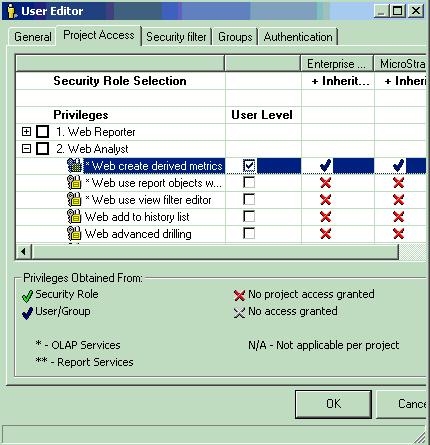
Similar to other license types that may be based on named users (for example, Architect or Desktop Designer), the OLAP Services licenses will also be counted and checked for compliance against the CD key, when such a count/check is performed manually through the Strategy License Manager or automatically by Strategy Intelligence Server.
NOTE:
Customers may purchase additional products from Strategy at any time so CD keys may not reflect the status of the current contractual licensing obligations that the customer has with Strategy.
NOTE:
Strategy Intelligence Server does an automatic named user compliance check once a day, as per the value set in 'Time to run license check' in 'Configure Strategy Intelligence Server' > Advanced. By default, this time is 23:59.
Similar to other license types, if the system is out-of-compliance for OLAP Services, it will go through the 3 levels of notification as explained in KB5800-750-0204. At Level 2, the end user message will list OLAP Services as one of the out-of-compliance license types. At Level 3, the OLAP Services privileges will be disabled in the user editor like other out-of-compliance license types.
Customers should contact their Strategy Account Executive for purchasing additional licenses. Customers, who believe that that the message is occurring due to an issue with the Strategy product, should contact Strategy Technical Support.
If no users and no CPUs are licensed for OLAP Services, then the functionality associated with the OLAP Services privileges will not be available for any user. These six privileges will be grayed out in the User Editor in Strategy Desktop.
New Privileges added to Web Reporter and Web Analyst
Begining from Strategy 7.5.1, Strategy Web introduces new functionality to integrate with the File Information Transmission Module (ITM) and Print ITM features in Strategy Narrowcast Server. The following new privileges are available under the following license types:
Web Reporter:
Web Analyst:
These privileges appear in the User Editor in Strategy Desktop under the license types listed above, as well as in the Command Manager Privileges List Outline.
Upon upgrading to Strategy 7.5.1 (or higher), these privileges will not be available by default. Administrators must explicitly grant these privileges to the users.
