EducationSoftwareStrategy.com
StrategyCommunity

Knowledge Base

Product

Community

Knowledge Base

TopicsBrowse ArticlesDeveloper Zone

Product

Download SoftwareProduct DocumentationSecurity Hub

Education

Tutorial VideosSolution GalleryEducation courses

Community

GuidelinesGrandmastersEvents
x_social-icon_white.svglinkedin_social-icon_white.svg
Strategy logoCommunity

© Strategy Inc. All Rights Reserved.

LegalTerms of UsePrivacy Policy
  1. Home
  2. Topics

KB9796: How to convert a CHAR to an INTEGER in MicroStrategy for SQL Server


Community Admin

• Strategy


In some cases, it is necessary to join two tables based on columns with different data types. For example, a fact table contains a SKU as a character field (CHAR), but the lookup table has a SKU as an integer (INT).

In some cases, it is necessary to join two tables based on columns with different data types. For example, a fact table contains a SKU as a character field (CHAR), but the lookup table has a SKU as an integer (INT).
 
In SQL Server, the CAST() function is used to convert data into a different data type and the ApplySimple() function in Strategy can be used to incorporate the CAST() function.
 
To convert a CHAR to an INTEGER in Strategy for SQL Server, change the definition of the attribute as follows:
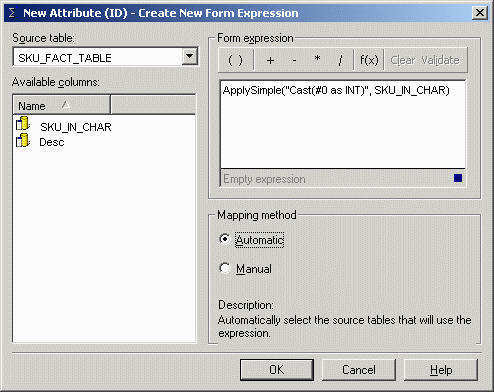
 

ka04W000000OhYzQAK_0EM440000002Fyi.gif

 
ApplySimple("cast(#0 as INT)", SKU_IN_CHAR)
Note: Ensure that the Update Schema is run after modifying the attribute.


Comment

0 comments

Details

Knowledge Article

Published:

May 15, 2017

Last Updated:

May 15, 2017