EducationSoftwareStrategy.com
StrategyCommunity

Knowledge Base

Product

Community

Knowledge Base

TopicsBrowse ArticlesDeveloper Zone

Product

Download SoftwareProduct DocumentationSecurity Hub

Education

Tutorial VideosSolution GalleryEducation courses

Community

GuidelinesGrandmastersEvents
x_social-icon_white.svglinkedin_social-icon_white.svg
Strategy logoCommunity

© Strategy Inc. All Rights Reserved.

LegalTerms of UsePrivacy Policy
  1. Home
  2. Topics

KB9836: How is the Web XML API log enabled in MicroStrategy Web


Community Admin

• Strategy


For troubleshooting purposes, it is possible to track and log all communications at the web API layer between the MicroStrategy Web and Intelligence Servers. To configure these diagnostics, load the MicroStrategy Web Administration page and select the Configuration link under the Diagnostics section. 

For troubleshooting purposes, it is possible to track and log all communications at the web API layer between the Strategy Web and Intelligence Servers. To configure these diagnostics, load the Strategy Web Administration page and select the Configuration link under the Diagnostics section. 
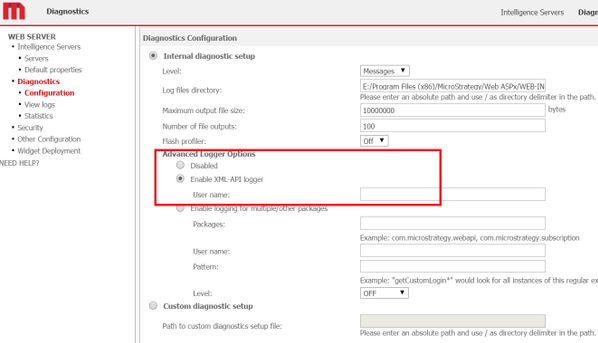
To enable this feature in Strategy Web, select Enable XML-API logger under the Advanced Logger Options section as shown in the following screenshot:
ka04W000000OepdQAC_0EM44000000YT1l.png

Do not fill in the Full Name field and instead leave it blank.
 
NOTE: Tracing should be enabled for specific troubleshooting purposes. Do not to leave tracing enabled for extended periods of time because doing so will adversely affect performance.
 
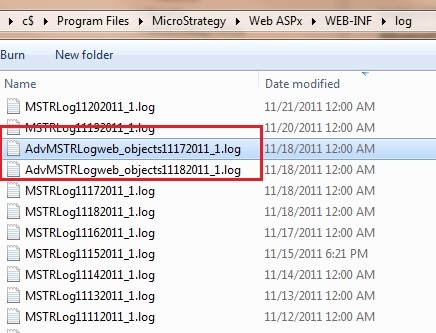
Once the XML log is enabled, the following log will be generated under the WEB-INF\log folder
 

ka04W000000OepdQAC_0EM44000000293o.jpeg

Comment

0 comments

Details

Knowledge Article

Published:

April 4, 2017

Last Updated:

February 15, 2018