When Metrics are built with dimensionality, by default, subtotals in Strategy Engine 9.x are aware of the dimensionality and are calculated accordingly. This document explains how to change this behavior, making the subtotal unaware of the metric dimensionality and calculating it at the Report data level.
Consider the following example report, which was built using Strategy Tutorial:
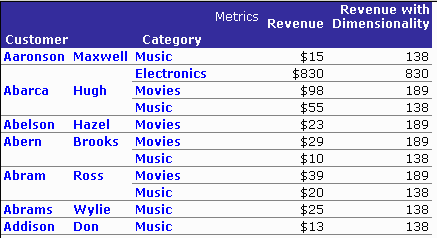
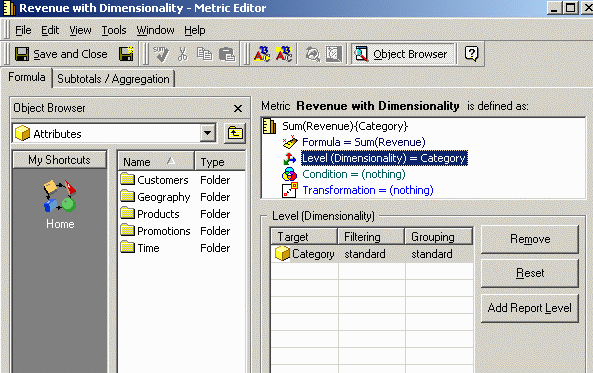
"Revenue with Dimensionality" is the sum of Revenue at the level of Category (excluding report level), as shown below:
By default, if a Subtotal is placed on the Report, the Subtotal will be aware of the dimensionality of the metric, as shown below:
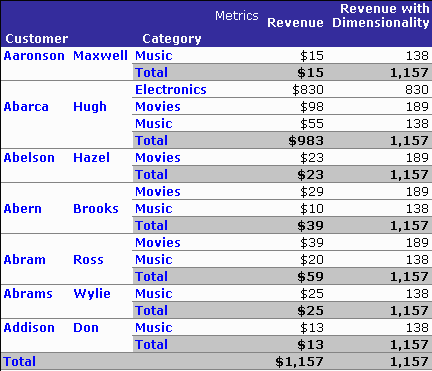
Note that the source data for subtotaling "Revenue with Dimensionality" exist only at Category level and do not show distinct values per customer. For example, the "Movies" category shows 189 for each customer, because Customer is omitted from the dimensionality. Since the correct metric behavior is to repeat the same Category-level values over all customers, the correct subtotaling behavior is to repeat the same subtotal value over all customers as well.
If users instead prefer to see the Subtotals broken by Customer, for the Metric without dimensionality, the Subtotal must be made unaware of the dimensionality of the Metric.
In order to make subtotals not dimensionally aware in Strategy 9.x, perform the following steps:
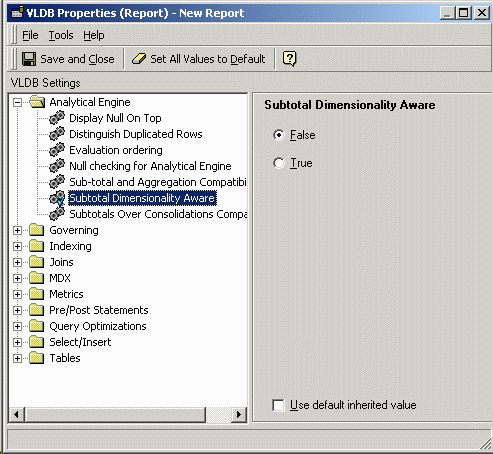
After the Strategy Analytical Engine processes the request, the Subtotals will appear as follows:
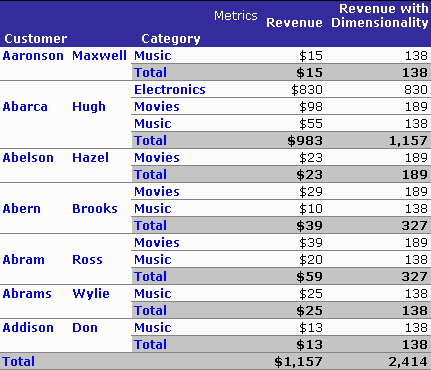
Note, however, that the grand total value for "Revenue with Dimensionality" is now inflated. When dimensionality-aware subtotals are disabled, higher-level subtotals are likely to be incorrect because the Analytical Engine has been instructed to total the displayed values blindly, without regard for repeated values that are the result of the metric's dimensionality. This is why dimensionality-aware subtotals are enabled by default.
