EducationSoftwareStrategy.com
StrategyCommunity

Knowledge Base

Product

Community

Knowledge Base

TopicsBrowse ArticlesDeveloper Zone

Product

Download SoftwareProduct DocumentationSecurity Hub

Education

Tutorial VideosSolution GalleryEducation courses

Community

GuidelinesGrandmastersEvents
x_social-icon_white.svglinkedin_social-icon_white.svg
Strategy logoCommunity

© Strategy Inc. All Rights Reserved.

LegalTerms of UsePrivacy Policy
  1. Home
  2. Topics

KB9938: "You are not allowed to change this protected property on the Administrator user" error message appears and users find that it is not possible to edit the Administrator user properties


Stefan Zepeda

Salesforce Solutions Architect • Strategy


It is not possible to change the Administrator user password from another account that has administrative privileges.

SYMPTOM:
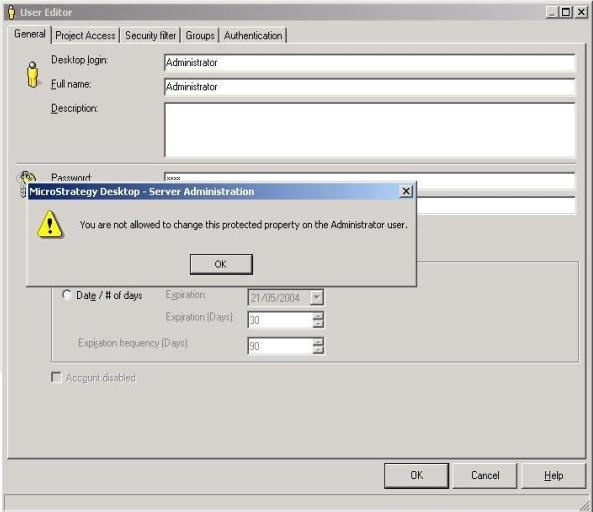
It is not possible to change the Administrator user password from another account that has administrative privileges, for example, when logged in as a user in the System Administrators Group. However, it is possible for a user with administrative privileges to change the password of another user with administrative privileges. If an attempt is made to edit the Administrator user's properties when logged on as another administrative user, the following message appears:
 

ka02R000000kY9VQAU_0EM440000002Fxi.jpeg

 
You are not allowed to change this protected property on the Administrator user.
CAUSE:
The original Administrator user that is created with the project has an additional restriction. This user does not allow its password or any other properties to be changed by another user, regardless of privilege.
 
ACTION:
To change the original Administrator user's password or edit any other properties pertaining to the Administrator user, it is necessary to login as the Administrator user.


Comment

0 comments

Details

Knowledge Article

Published:

June 9, 2017

Last Updated:

June 9, 2017