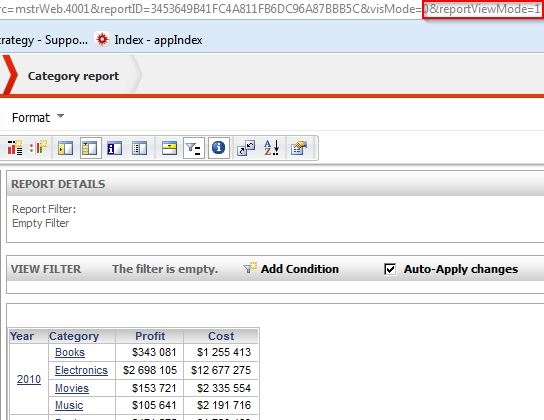
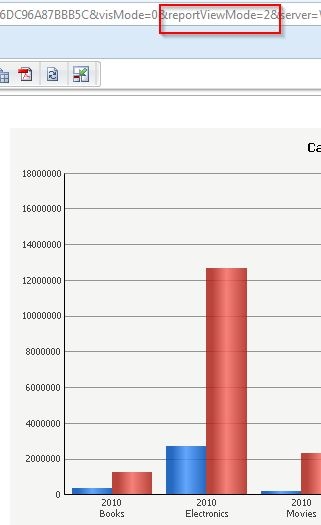
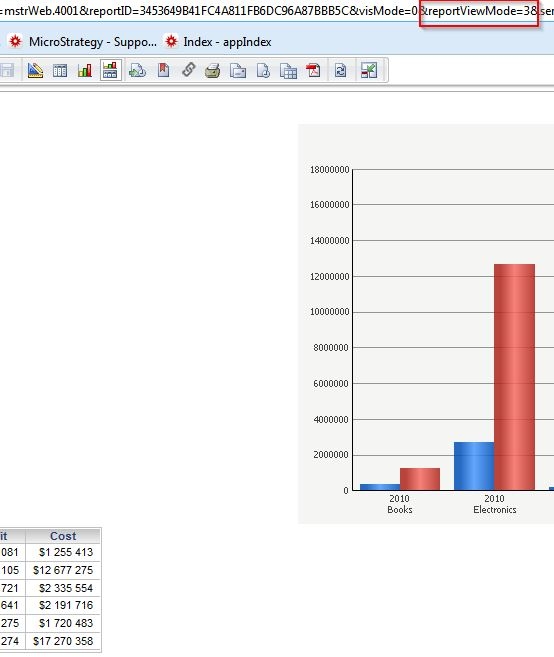
The URL parameter reportviewmode determines how reports are displayed in the view mode through the URL API in Strategy Web 10.x. The following examples illustrate the URL parameter reportviewmode and the corresponding view of the report that will display:
When reportviewmode is set to 1, the report is displayed in grid mode:
When reportviewmode is set to 2, the report is displayed in graph mode:
When reportviewmode is set to 3, the report is displayed in grid/graph mode:
Code Customization:
WARNING:
This customization is provided as a convenience to Strategy users and is only directly applicable to the version stated. While this code may apply to other releases directly, Strategy Technical Support makes no guarantees that the code provided will apply to any future or previous builds. In the event of a code change in future builds, Strategy Technical Support makes no guarantee that an updated version of this particular customization will be provided. In the event of a code change in future builds, Strategy may not be able to provide additional code on this matter even though this customization is provided at this time for this specific build. For enhancements to this customization or to incorporate similar functionality into other versions, contact your Account Executive to inquire about Strategy Consulting assistance.
