EducationSoftwareStrategy.com
StrategyCommunity

Knowledge Base

Product

Community

Knowledge Base

TopicsBrowse ArticlesDeveloper Zone

Product

Download SoftwareProduct DocumentationSecurity Hub

Education

Tutorial VideosSolution GalleryEducation courses

Community

GuidelinesGrandmastersEvents
x_social-icon_white.svglinkedin_social-icon_white.svg
Strategy logoCommunity

© Strategy Inc. All Rights Reserved.

LegalTerms of UsePrivacy Policy
  1. Home
  2. Topics

KB9997: Users open MicroStrategy Developer on a local machine but cannot find any projects listed under the Project Source and instead only see the Administration icon for MicroStrategy.


Stefan Zepeda

Salesforce Solutions Architect • Strategy


KB9997: Users open MicroStrategy Developer on a local machine but cannot find any projects listed under the Project Source and instead only see the Administration icon for MicroStrategy.

SYMPTOM:
A user opens Strategy Developer on a local machine and can only see the Administration icon even though projects are registered and loaded under the Project Source.
 
The screen shot below illustrates this after a user has opened Strategy Developer and clicked on the Project Monitor:
 

ka04W000001IvPXQA0_0EM440000002Fx1.jpeg

 
CAUSE:
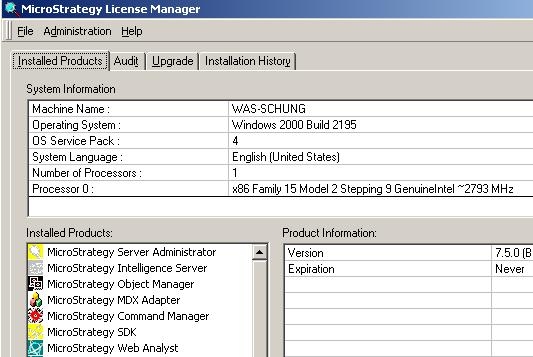
This behavior occurs because none of the following products are installed:
 

  • Strategy Developer Analyst
  • Strategy Developer Designer
  • Strategy Architect

If none of these three products are installed, users will not see the projects listed in Strategy Developer.
 
This can be confirmed by using License Manager and searching under the Installed Products tab, as shown below:
ka04W000001IvPXQA0_0EM440000002FxF.jpeg

 
ACTION:
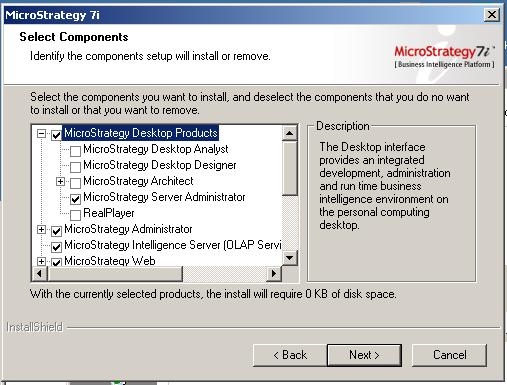
To resolve this issue, install one or all of the three products on the machine:
ka04W000001IvPXQA0_0EM440000002Fx6.jpeg

 
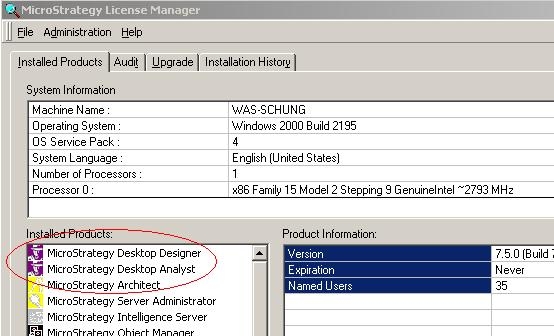
After installation, confirm that the products are installed by running License Manager:
ka04W000001IvPXQA0_0EM440000002Fx4.jpeg

 
Now, open Strategy Developer and log into the Project Source. Notice that all of the projects are now listed:

ka04W000001IvPXQA0_0EM440000002Fx2.jpeg


Comment

0 comments

Details

Knowledge Article

Published:

June 15, 2017

Last Updated:

May 12, 2022