Starting with the release of Strategy ONE (March 2024), dossiers are also known as dashboards.
In Strategy 2020, the Compound Grid was introduced in dossier authoring. A Compound Grid stitches multiple simple Grid visualizations together to provide a more holistic grid view with richer data insights.
Like other visualizations, a Compound Grid can be used as the target of a selector. However, using a slicing selector to target a Compound Grid can cause issues in the dossier.
How do I get a slicing selector? Create a dossier based on a dataset containing a custom group or a consolidation object. Use the custom group or the consolidation object as the source object of an in-canvas selector. This will result in a slicing selector.
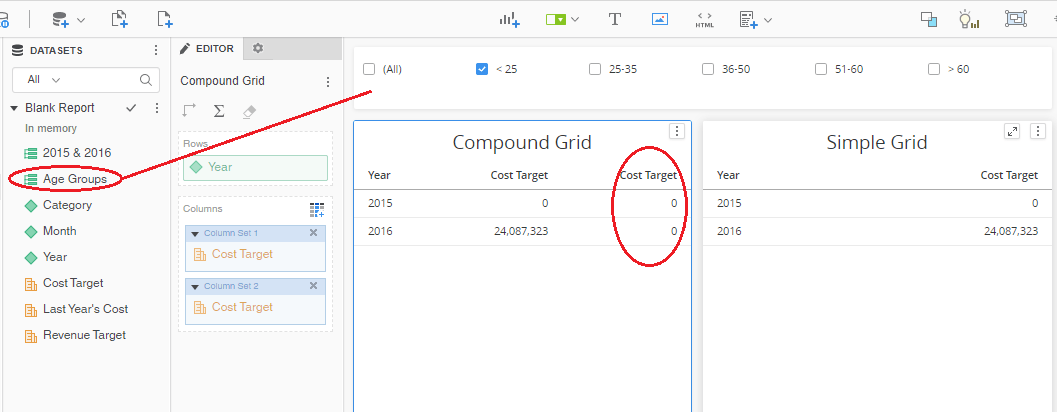
For example, in the dossier below, the Age Group object is a custom group. It is used as the source object of the highlighted in-canvas selector, so it is operating as a slicing selector. The selector targets both visualizations below: the Compound Grid and a Simple Grid.
We can see both visualizations contain the same objects, the Year attribute and the Cost Target metric. However, the data of Cost Target is incorrect in the Compound Grid.
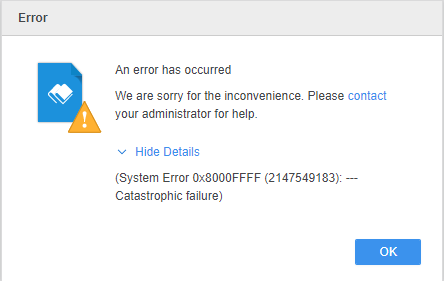
If you then sort by Ascending or Descending on the Cost Target metric, an error appears:
"An error has occurred: We are sorry for the inconvenience. Please contact your administrator for help. (System Error 0x8000FFFF (2147549183): -- Catastrophic failure)"
This is a known issue in Strategy 2020 with the Compound Grid visualization.
Strategy's Technology team is currently investigating this issue. Stay tuned for a fix.
In the meantime, it is not recommended to use a slicing selector to target a Compound Grid visualization.
