EducationSoftwareStrategy.com
StrategyCommunity

Knowledge Base

Product

Community

Knowledge Base

TopicsBrowse ArticlesDeveloper Zone

Product

Download SoftwareProduct DocumentationSecurity Hub

Education

Tutorial VideosSolution GalleryEducation courses

Community

GuidelinesGrandmastersEvents
x_social-icon_white.svglinkedin_social-icon_white.svg
Strategy logoCommunity

© Strategy Inc. All Rights Reserved.

LegalTerms of UsePrivacy Policy
  1. Home
  2. Topics

KB442004:Landscape view only document displays as portrait when mobile device placing in vertically on MicroStrategy Mobile 10.11 for Android


Sheng (Randy) Wu

Senior Cloud Support Engineer III • MicroStrategy


SYMPTOM:
There are two documents A & B. Document A set to portrait only and document B set to landscape only on Mobile, and there is a link from A to B.
On Android device, turn off the mobile Rotation Lock. 
Hold the mobile device vertically, and run the document A, which display correctly. And then link to document B with device still in vertical holding, the document B still display in portrait view, instead of landscape view as expected.
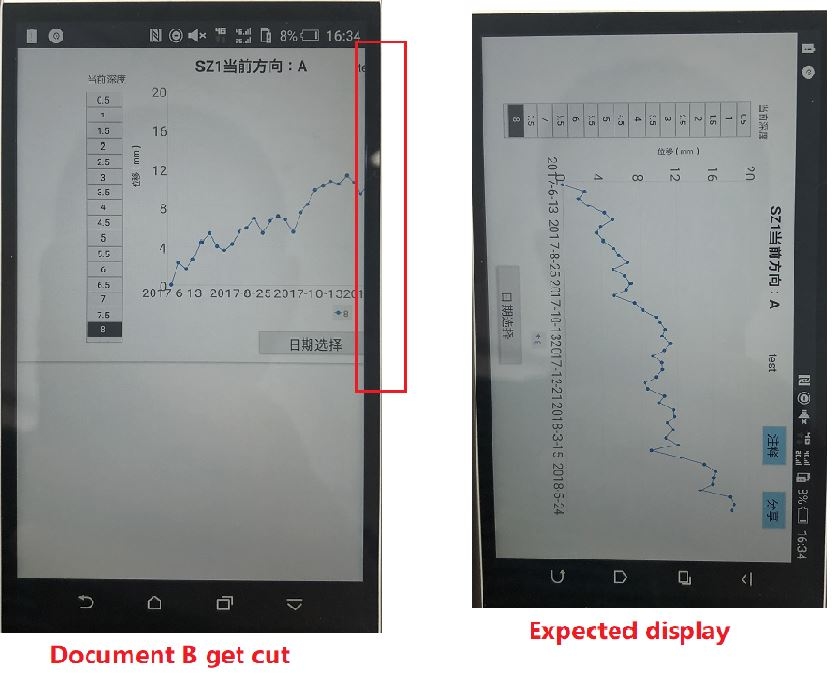
ka04W000001Iv6yQAC_0EM44000000Qx00.jpeg

And then, there are two possible subsequent scenarios after changing to hold the mobile device vertically to horizontally:

  • Keep the rotation lock turned off, the document B change to landscape view and display correctly
  • The document B display in landscape view only when the device rotation lock is turned on

CAUSE:
This is a known issue in Strategy Mobile 10.11 for Android
ACTION:
This issue has been  fixed in Strategy Mobile 10.11 for Android, please upgrade to Strategy Mobile 10.11 for Android to take advantage of the fix.


Comment

0 comments

Details

Knowledge Article

Published:

September 28, 2018

Last Updated:

November 14, 2018