EducationSoftwareStrategy.com
StrategyCommunity

Knowledge Base

Product

Community

Knowledge Base

TopicsBrowse ArticlesDeveloper Zone

Product

Download SoftwareProduct DocumentationSecurity Hub

Education

Tutorial VideosSolution GalleryEducation courses

Community

GuidelinesGrandmastersEvents
x_social-icon_white.svglinkedin_social-icon_white.svg
Strategy logoCommunity

© Strategy Inc. All Rights Reserved.

LegalTerms of UsePrivacy Policy
  1. Home
  2. Topics

KB485780: Links created inside an ESRI tooltip within a dossier do not display the "URL Display Text" value correctly in the Library Mobile App


Stefanie Polleri

Senior Cloud Support Engineer III • MicroStrategy


This article describes a behaviour within the Library Mobile app, whereby links in an ESRI map tooltip do not display as links but as HTML text instead.

Starting with the release of Strategy ONE (March 2024), dossiers are also known as dashboards.
Steps to reproduce

  1. Create a dossier with ESRI map visualization, for example with Region attribute displaying areas with the Countries of the World layer.
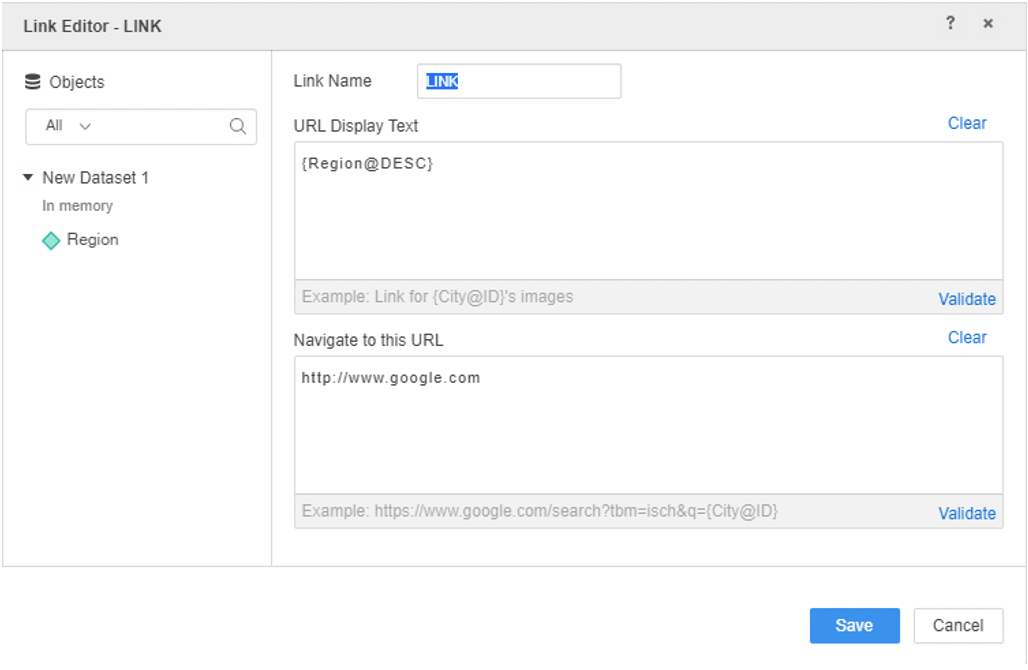
  2. Right-click on Region attribute and create link.
  3. Within link editor add a name, for example 'Link' and add URL Display Text, for example '{Region@DESC}' and then add Navigate to this URL - http://www.google.com:
ka0PW0000001JjdYAE_0EM4W000006Gzdd.jpeg

This will be saved as a derived attribute
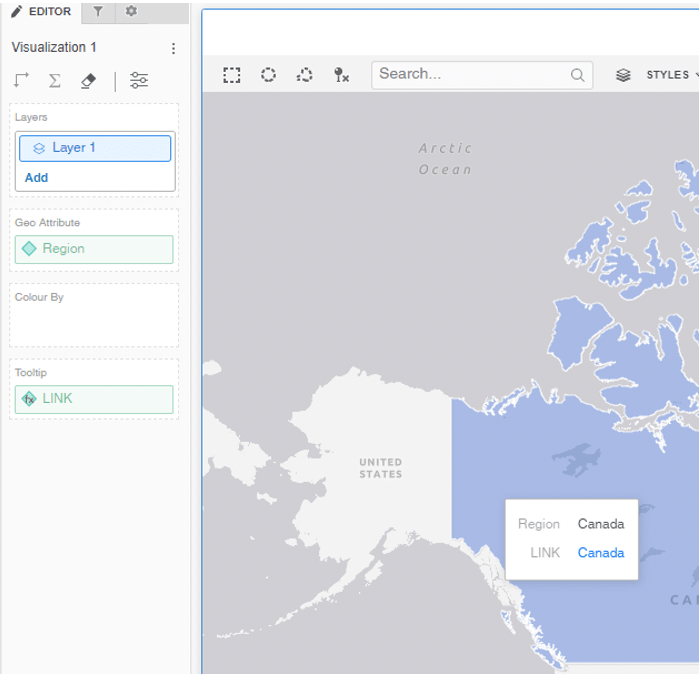
 

  1. Then add this newly created derived attribute to the tooltip of the visualization:
ka0PW0000001JjdYAE_0EM4W000006GzdJ.jpeg

It will display fine in Library Web and the link can be accessed without issues.
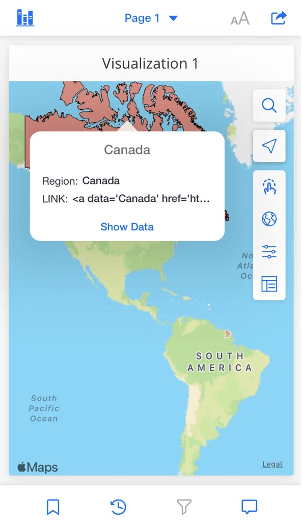


  1. Open same dossier in Library Mobile app and see that link is not working:
ka0PW0000001JjdYAE_0EM4W000006GzdO.jpeg

Link within tooltip does not show correctly > the URL Display Text and URL will be displayed as HTML text:  Link: <a data='Canada' href='http....
 

Action


This behaviour is currently under investigation, please contact Strategy Technical Support for an update on the status of this issue.


Comment

0 comments

Details

Knowledge Article

Published:

November 16, 2022

Last Updated:

March 21, 2024