In computing, a page cache, sometimes called a disk cache, is a transparent cache for the pages originating from a secondary storage device, such as a hard disk drive (HDD) or a solid-state drive (SSD). The operating system keeps a page cache in otherwise unused portions of the main memory (RAM), resulting in quicker access to the contents of cache pages and overall performance improvements. A page cache is implemented in kernels with the paging memory management and is mostly transparent to applications.
Under Linux, you can check the page cache size via the command
free -w -h. The page cache size is indicated in the cache column.

If data is written, it is first written to the page cache, and managed as one of its dirty pages. Dirty means that the data is stored in the page cache, but needs to be written to the underlying storage device first. The content of these dirty pages is periodically transferred (as well as with the system calls sync or fsync) to the underlying storage device. The system may, in this last instance, be a RAID controller or the hard disk directly.
File blocks are written to the page cache not just during writing, but also when reading files. For example, when you read a 100-megabyte file twice, once after the other, the second access is quicker. This is because the file blocks come directly from the page cache in memory, and do not have to read from the hard disk again.
File reading and writing generate page caches as the Strategy server reads and writes big data files, such as cube files or other cache files, while the server is running. The system page cache increase significantly while the Strategy server runs.
The page cache mechanism is provided by Linux kernel. The Linux kernel attempts to optimize RAM utilization by occupying unused RAM with caches.
This is done on the basis that unused RAM is wasted RAM. The page cache is not released until there is not enough memory to be used.
A disk cache is a software mechanism that allows the system to keep in the RAM some data that is normally stored on a disk, so that further access to that data can be satisfied quickly without accessing the disk.
Disk caches are crucial for system performance, because repeated access to the same disk data is common. A user mode process that interacts with a disk is entitled to ask repeatedly to read or write the same disk data.
Furthermore, different processes may also need to address the same disk data at different times. For example, you may use the
cpcommand to copy a text file, and then invoke your preferred editor to modify it.
echo 1 > /proc/sys/vm/drop_caches
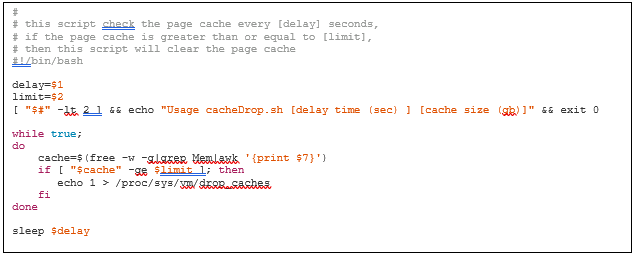
Clearing cache will free RAM, but it causes the kernel to look for files on the disk, rather than in the cache. This can cause performance issues.
Normally, the kernel will clear the cache when the available RAM is depleted. It frequently writes dirtied content to the disk using pdflush.
The Linux kernel attempts to optimize RAM utilization by occupying unused RAM with caches. This is done on the basis that unused RAM is wasted RAM.
Over time, the kernel will fill the RAM with the cache. As more memory is required by the applications/buffers, the kernel goes through the cache memory pages and finds a block large enough to fit the requested malloc. It then frees that memory and allocates it to the calling application.
Under some circumstances, this can affect the general performance of the system as cache de-allocation is time consuming compared to accessing unused RAM. Higher latency can therefore sometimes be observed.
This latency will be based on the fact that RAM is being used to its full speed potential. No other symptoms may occur apart from overall and potentially sporadic latency increases. The equivalent is similar to symptoms that may be observed if the hard disks are not keeping up with reads and writes. The latency may also affect either Aerospike or operating system components, such as network cards, iptables, and iproute2 mallocs. This may show network-based latency instead.
Currently, there is no explicit or specific percentage of page cache that is considered huge or abnormal. Normally, when memory depletion or delayed system performance occurs, page cache can be a checkpoint. You can try to clear the page cache to see if performance improves.
When publishing large Intelligent Cube files, a large amount of memory is required. To reduce the impact on page cache on Linux, Strategy introduced the environment variable,
FILE_CACHE_SIZE_THRESHOLD.This variable can be used to specify the maximum size of an Intelligent Cube (in megabytes) that is allowed to stay in the page cache.
Wikipedia Page Cache
Thomas Krenn Linux Page Cache Basics
Aerospike: How to tune the Linux kernel for memory performance
Server Fault: Why drop caches in Linux?
