EducationSoftwareStrategy.com
StrategyCommunity

Knowledge Base

Product

Community

Knowledge Base

TopicsBrowse ArticlesDeveloper Zone

Product

Download SoftwareProduct DocumentationSecurity Hub

Education

Tutorial VideosSolution GalleryEducation courses

Community

GuidelinesGrandmastersEvents
x_social-icon_white.svglinkedin_social-icon_white.svg
Strategy logoCommunity

© Strategy Inc. All Rights Reserved.

LegalTerms of UsePrivacy Policy
  1. Home
  2. Topics

Lloydspharmacy Expands Use of MicroStrategy


Nahiyan Khan

Technical Support Intern • Strategy


Lloydspharmacy has selected the MicroStrategy Business Intelligence Platform(TM) to deliver its corporate management information and improve decision-support reporting. The largest community pharmacy in the UK, Lloydspharmacy generates turnover of 1.4 billion pounds Sterling from more than 1,400 pharmacies and employs over 13,000 people. Previously using MicroStrategy to analyze over-the-counter sales, Lloydspharmacy has now expanded its deployment across its Operations and Finance departments, with applications going live for Management Reporting in February 2005 and Key Performance Indicator (KPI) reporting going live in April 2005. The new implementations are part of an Information Strategy to improve data management, analysis, and reporting, aimed at enhancing the decision making processes of senior and operational management.

Description


Running a report as a user signed in with LDAP authentication configured with Binding instead of Password comparison causes the following error message appears:
Message not found in user history list. It may have been deleted from other session already. Please refresh your history list.
 

ka02R000000g2yRQAQ_0EM2R000000m8If.jpeg

Steps to Reproduce

  • Open Strategy Intelligence Server configuration.
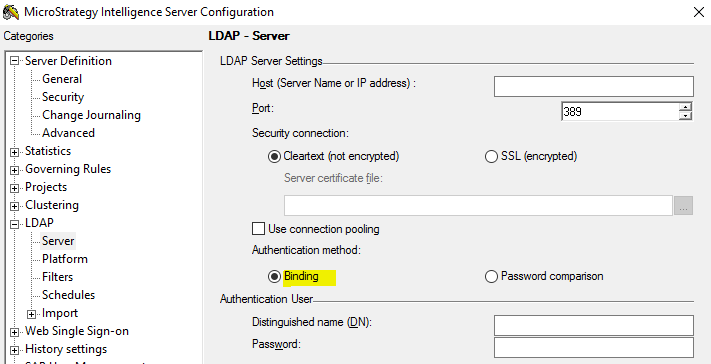
  • Navigate to LDAP > Server.
  • Select Binding for the LDAP authentication method.
ka02R000000g2yRQAQ_0EM2R000000m8Ij.jpeg
  • Open the User Editor the desired user.
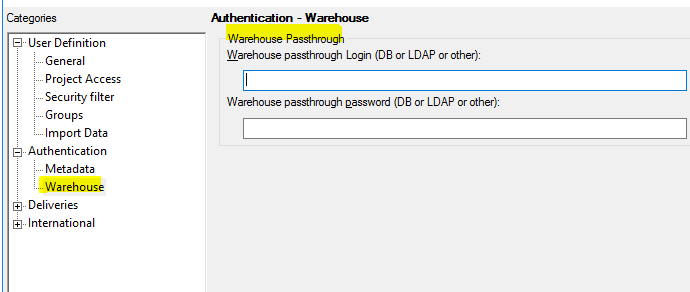
  • Navigate to Authentication > Warehouse. 
  • Set the Warehouse Authentication to use Warehouse Passthrough.
ka02R000000g2yRQAQ_0EM2R000000m8J8.jpeg
  • Run the report. Notice a variation of the following error appears:
    Message not found in user history list. It may have been deleted from other session already. Please refresh your history list.QueryEngine encountered error: Connect failed. Error type: Odbc error. Odbc operation attempted: SQLDriverConnect. [HY000:28000: on SQLHANDLE][Strategy][ODBC Oracle Wire Protocol driver][Oracle]ORA-28000: the account is locked. Error in Process method of Component: QueryEngineServer, Project 'XXX', Job ‘XXX’, Error Code=-2147212544.)"
     

Why is this happening?


The reason this error appears is because the Binding setting in the LDAP Server configuration causes the user's credentials to be re-authenticated against the LDAP server. As a result, this populates the Warehouse Passthrough. 
Since the user's credentials are not the same as the credentials needed to access the database, the report fails to run against the database because the login is not valid.
 

Solution


To avoid this error, change the LDAP authentication mode to Password comparison and update or clear the credentials in the Warehouse Passthrough.

  1. Open Strategy Intelligence Server configuration.
  2. Navigate to LDAP > Server.
  3. Select Password Comparison for the LDAP authentication method.
  4. Open the User Editor the desired user.
  5. Navigate to Authentication > Warehouse. 
  6. Update or clear the Warehouse Passthrough.

Workaround


If a large number of users have been affected, the password can be adjusted using Command Manager by running the script below.
Note: Change

Administrator
to the name of the user.
ALTER USER "Administrator" WHLINK "";


Comment

0 comments

Details

Knowledge Article

Published:

June 6, 2017

Last Updated:

June 6, 2017