EducationSoftwareStrategy.com
StrategyCommunity

Knowledge Base

Product

Community

Knowledge Base

TopicsBrowse ArticlesDeveloper Zone

Product

Download SoftwareProduct DocumentationSecurity Hub

Education

Tutorial VideosSolution GalleryEducation courses

Community

GuidelinesGrandmastersEvents
x_social-icon_white.svglinkedin_social-icon_white.svg
Strategy logoCommunity

© Strategy Inc. All Rights Reserved.

LegalTerms of UsePrivacy Policy
  1. Home
  2. Topics

KB483785: Logging in to the 2019 MicroStrategy connector results in the error, “unauthorized, got status 401.”


Huan Guo

Software Engineer, Principal • MicroStrategy


This article explains why you may get the error, “unauthorized, got status 401" when logging in to the 2019 MicroStrategy connector. This article provides two types of solutions.

Description


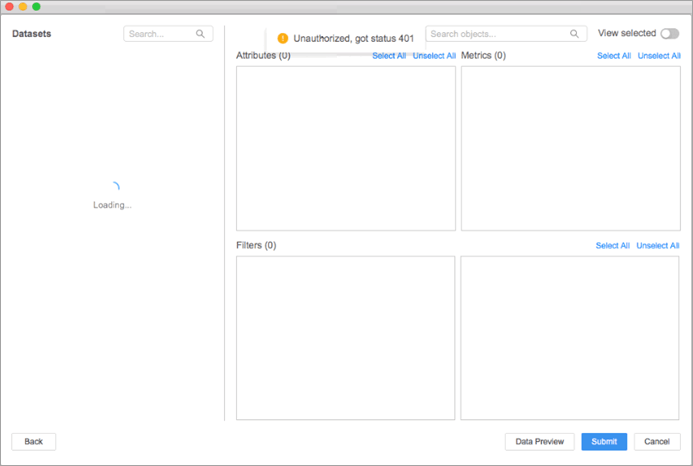
When logging in to the 2019 Strategy connector on Workstation for Mac, the following error appears:
"unauthorized, got status 401."
ka02R000000g4RPQAY_0EM2R000000mlsI.jpeg

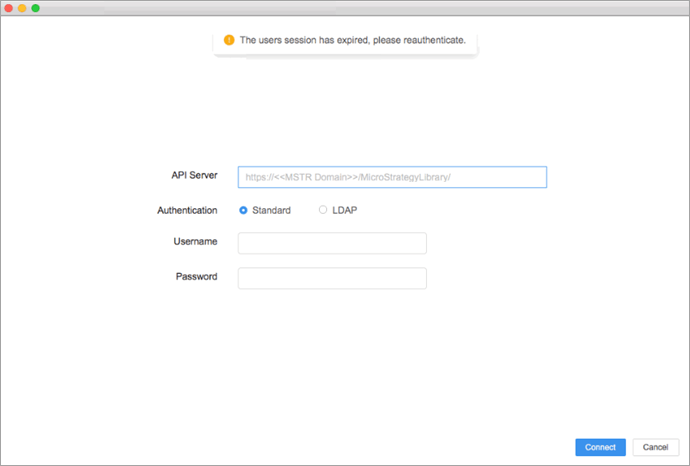
After a moment, the error changes to:
"the user session has expired, please reauthenticate" 
ka02R000000g4RPQAY_0EM2R000000mlsN.jpeg

Why is this happening?


These errors appear when the connector server and the Library server are not on the same domain and the proxy

proxy=false 
mode is still used to log in. When this is the case, the response header set cookies are ignored by the WebKit based application, which on Mac is Safari, due to the cross-origin site policy. For more information, see the Same Origin Policy.

Solution


There are two ways to resolve these errors: Enable cross-site tracking in Safari, or change the proxy to ?proxy=true.
How to Enable Cross-Site Tracking in Safari

  • Close Workstation.
  • On your Mac, open Safari.
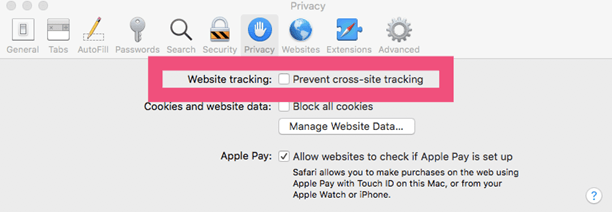
  • Click Preferences > Privacy.
  • Uncheck the Prevent cross-site tracking checkbox.
ka02R000000g4RPQAY_0EM2R000000mlt6.jpeg
  • Open Workstation.

How to Modify the Proxy


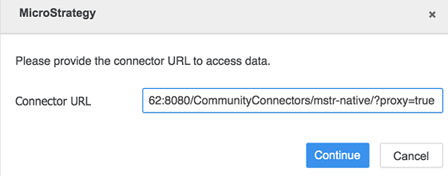
Ask the Web Server Administrator to append

?proxy=true
to the connector URL.

ka02R000000g4RPQAY_0EM2R000000mltB.jpeg


Comment

0 comments

Details

Knowledge Article

Published:

November 13, 2019

Last Updated:

November 13, 2019