EducationSoftwareStrategy.com
StrategyCommunity

Knowledge Base

Product

Community

Knowledge Base

TopicsBrowse ArticlesDeveloper Zone

Product

Download SoftwareProduct DocumentationSecurity Hub

Education

Tutorial VideosSolution GalleryEducation courses

Community

GuidelinesGrandmastersEvents
x_social-icon_white.svglinkedin_social-icon_white.svg
Strategy logoCommunity

© Strategy Inc. All Rights Reserved.

LegalTerms of UsePrivacy Policy
  1. Home
  2. Topics

KB483906: MDX-related diagnostic logs for troubleshooting performance problems


Shushu Xu

Quality Engineer, Principal • MicroStrategy


This article summarizes how to collect logs for troubleshooting MDX-related performance problems.

Starting with the release of Strategy ONE (March 2024), dossiers are also known as dashboards.

Use the Strategy Diagnostics and Performance Logging Tool to collect information from the Strategy Intelligence Server


The Engine > Perf trace can be used to get overall processing steps for the MDX engine, query engine, and analytic engine when executing a dossier, dashboard, or report against the MDX data source. 

ka0PW0000001JatYAE_0EM2R000000nEVW.jpeg

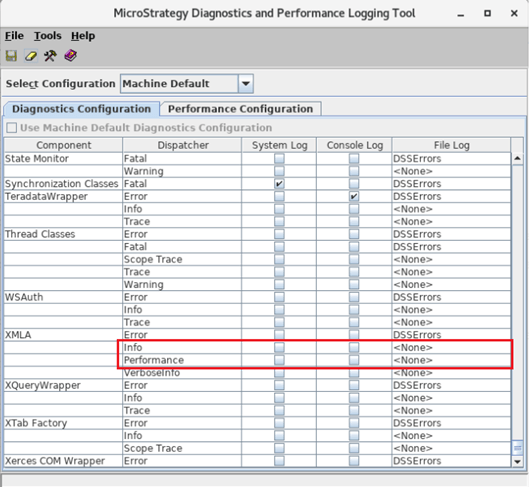
Enable XMLA-related logs to track the interaction between the Intelligence Server and MDX cube provider. 
ka0PW0000001JatYAE_0EM2R000000nEWy.jpeg


Collect the MDX cube provider log on the provider machine


For MDX querying using the Strategy cube provider, ODBCOConnector-related logs can provide detailed information during the data fetching stage and determine the potential problem on the MDX cube provider. 
You should be aware that with these logs enabled, there will be performance overhead introduced due to large quantities of records being logged to the disk. You should remember to disabled the entries after testing. 

ka0PW0000001JatYAE_0EM2R000000nEZs.jpeg


Monitor the performance of the data source


Different tools can be adopted to monitor the query execution time of the various data sources:

  • For querying against MSAS, use the SQL Server Profiler to capture and replay data traces on the source-side.
  • For querying against SAP BW, use the transaction RSRT via SAP GUI to monitor your query. 

Comment

0 comments

Details

Knowledge Article

Published:

December 19, 2019

Last Updated:

March 21, 2024