SUMMARY
This knowledge base article describes an issue that has been classified as a defect by Strategy. In Strategy Secure Enterprise 10.x, when all database connections to the primary database instance warehouse are in-use, an MTDI (Multi-Table Data Import) Cube refresh job running against a non-primary database instance will wait in the queue for an available connection to the primary database instance before executing.
SYMPTOM
In Strategy Secure Enterprise 10.x, if all connections to the primary database instance are in-use, an MTDI cube refresh job accessing a non-primary database instance will show up as 'waiting' in the job monitor even though connections to the non-primary database instance are available. Rather than immediately receiving one of the available connections or creation a new connection to the non-primary database instance, the job waits in the queue until a connection to the primary database instance is available for use and at that point, the job will move to execution against the correct non-primary database instance. If the MTDI cube is refreshed when connections to the primary database instance are already available, the cube refresh will receive the database connection and move to execution against the non-primary database instance.
STEPS TO REPRODUCE
1. Check the number of total database connections allowed for the primary database instance.
2. Execute a number of jobs that will require a connection to the primary database instance so that all available connections are in-use
3. Execute an MTDI cube refresh for a cube pointing to a non primary database instance
4. The MTDI cube refresh job will show up as 'Waiting' in the queue
5. When one of the database connections for the primary database instance is available, the MTDI cube refresh job will show up as 'Executing'
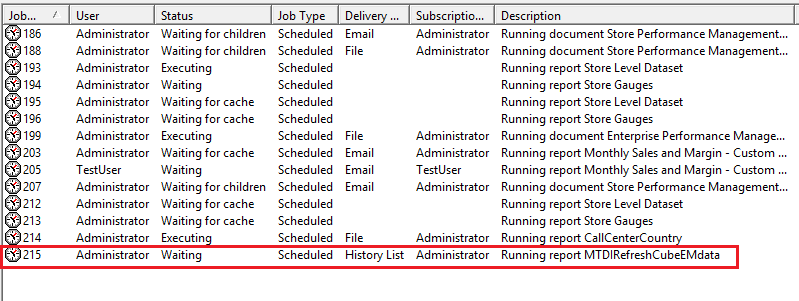
In the above screenshot, there are three connections allowed for the primary database instance, and there are three jobs currently executing against that data warehouse. The other jobs set to run against this data warehouse are 'waiting' in the queue. The job marked in red is an MTDI cube refresh job that will execute against a non-primary database instance. Even though there are connections available for that non-primary database instance, the MTDI cube refresh job waits in the queue until a connection to the primary database instance is available.
CAUSE
This is a known behavior with Strategy Secure Enterprise 10.x. In the current design, when an MTDI cube refresh is run, it first attempts to connect to the primary database instance warehouse for that project before connecting to and executing against the correct database instance.
ACTION
This issue has been addressed with Strategy 11.0 and above. The same fix is included in Strategy 2019. Upgrade to Strategy 2019 to take advantage of the fix.
WORKAROUND
1. Use a regular Intelligent Cube (created from Strategy Developer) rather than an MTDI cube: If the MTDI cube can be created as a regular OLAP Intelligent Cube, the intelligent cube refresh job will follow the expected connection behavior and this issue can be avoided.
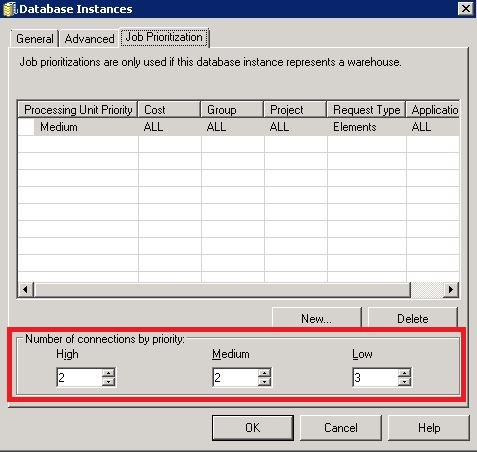
2. Increase number of connections available to the primary database instance: If the primary database instance is allowed more connections than are typically in use at one time, the issue may not have as much impact because the connections will be more readily available to the the MTDI cube refresh job. Users can define number of connections on the Job Prioritization tab in the Database Instance editor, as displayed in the screen shot below:
Article Reference Number: KB440179
000040179 KB440179
