Starting with the release of Strategy ONE (March 2024), dossiers are also known as dashboards.
Metadata manipulations, such as a metadata upgrade or project duplication, that insert Asian language characters may fail when they are run against a Teradata database. The following error appears:
One of the characters or code point does not exist within the specified repertoire

This is a database configuration problem that is specific to Teradata. The default value of the Character Set is ASCII which doesn’t support Asian languages. Thus, inserting Asian characters will return the error and end the manipulation process.
Change the Session Character Set from ASCII (default) to UTF16.
Change the setting via ODBC Data Source Administrator:
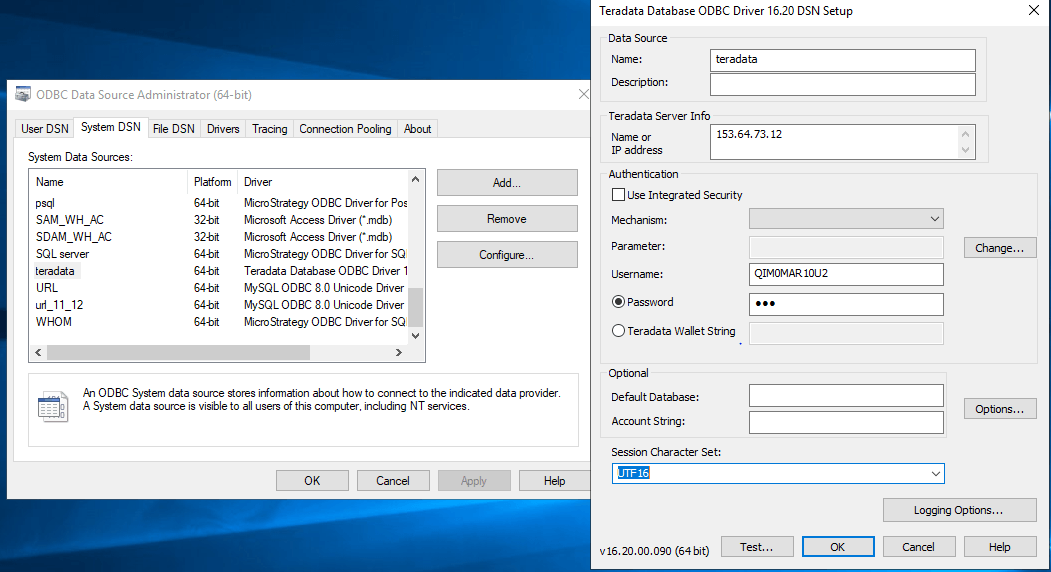
Change the setting in the
odbc.inifile:
odbc.inifile under
/opt/mstr/MicroStrategy/odbc.ini.
CharacterSet=UTF16
Including:
.mstrfile which contains an object named with an emoji
Error messages:
DSSErrors.log: [Teradata Database] (-5356) One of the characters or code point does not exist within the specified repertoire.
Error when trying to import a package which contains an object named with an emoji:

Error when trying to name a folder, report, or dossier with an emoji:

Teradata does not currently support emojis.
Enable Unicode Pass Through (UPT). For more information, see the Teradata documentation.
Change the setting via ODBC Data Source Administration:

