EducationSoftwareStrategy.com
StrategyCommunity

Knowledge Base

Product

Community

Knowledge Base

TopicsBrowse ArticlesDeveloper Zone

Product

Download SoftwareProduct DocumentationSecurity Hub

Education

Tutorial VideosSolution GalleryEducation courses

Community

GuidelinesGrandmastersEvents
x_social-icon_white.svglinkedin_social-icon_white.svg
Strategy logoCommunity

© Strategy Inc. All Rights Reserved.

LegalTerms of UsePrivacy Policy
  1. Home
  2. Topics

KB484110: Metric qualification filter defined on an attribute in another dataset cannot be applied correctly in a Connect Live dataset in versions prior to MicroStrategy 2020


Min Zhao

Quality Engineer, Principal • MicroStrategy


This article explains why metric qualification filters defined on attributes in another dataset cannot be applied correctly in a Connect Live dataset. This article also provides a solution to avoid this error.

Starting with the release of Strategy ONE (March 2024), dossiers are also known as dashboards.

Description


Prior to Strategy 2020, metric qualification filters defined on an attribute in another dataset cannot be successfully applied when the following conditions are met:

  • Connect Live datasets is used
  • Filter push down is not applied
  • Changes in data
  • Changes in the Cube Setting Instruction (CSI)

Steps to reproduce


The following example uses Strategy Tutorial attributes and metrics: 
  • Open Strategy Web.
  • Create two datasets. We use Strategy Tutorial tables that have the Call Ctr Id attribute.
    1. Create the new dataset DS1:
      1. Add External Data > Databases > Select Tables.
      2. Select the CITY_CTR_SLS table from data source Tutorial Data.
      3. Click Finish.
      4. Click Connect Live.
    2. Create the new dataset DS2:
      1. Add External Data > Databases > Select Tables.
      2. Select the LU_CALL_CTR table from data source Tutorial Data.
      3. Click Finish.
      4. Click Connect Live
  • Create a new dossier and add the two datasets created in step 2.
  • Link Call Ctr Id in both datasets to each other:
    1. Right-click Call Ctr Id in one of the datasets.
    2. Click Link to Other Dataset.
    3. Select Call Ctr Id.
  • In Strategy Web, create a dossier with C01 and C02 as the datasets.
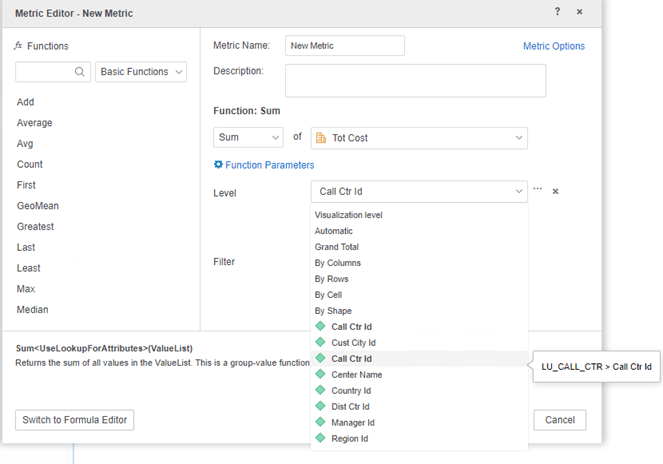
  • Create derived metric M01 in C01 with level set as attribute Call Ctr Id in C02.
ka0PW0000001Ji8YAE_0EM2R000000o9QY.jpeg
  • Add attribute Center Name from C02 and metric Tot Cost from C01 to the grid visualization.
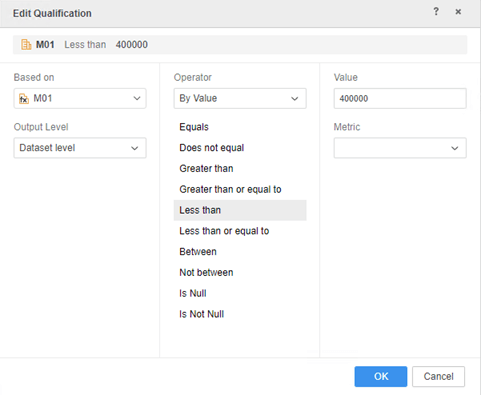
  • Add a metric qualification filter:
    • In the top right corner of the visualization, click the button > Edit Filter.
    • Click Add New Qualification.
    • Choose metric M01.
    • Set the operator and value. For example, “Less Than, 400000."
    • From Output Level drop-down, choose Dataset Level.
    • Click OK and Save.
ka0PW0000001Ji8YAE_0EM2R000000o9Qi.jpeg
    • No data is returned for the visualization.
  • In Query Details, notice the metric qualification is evaluated in Step 2 CSI. However, the derived metric M01 is missing from runTimeReport CITY_CTR_SLS_2 generated in Step 1 SQL Query.

Step 1 (SQL QUERY)


SQL Statements:

Pass0 - 	Query Pass Start Time:		3/3/2020 4:30:34 PM
	Query Pass End Time:		3/3/2020 4:30:34 PM
	Query Execution:	0:00:00.00
	Data Fetching and Processing:	0:00:00.00
	  Data Transfer from Datasource(s):	0:00:00.00
	Other Processing:	0:00:00.04
	Rows selected: 15
select	distinct a11.CALL_CTR_ID  CALL_CTR_ID
from	dbo.CITY_CTR_SLS	a11

Pass1 - 	Query Pass Start Time:		3/3/2020 4:30:34 PM
	Query Pass End Time:		3/3/2020 4:30:34 PM
	Query Execution:	0:00:00.00
	Data Fetching and Processing:	0:00:00.00
	  Data Transfer from Datasource(s):	0:00:00.00
	Other Processing:	0:00:00.00
[Populate Report Data]

[Analytical engine calculation steps:
	1.  Perform cross-tabbing
]

to  CITY_CTR_SLS_2

Step 1 (CSI)

select	([Call Ctr Id]@[CALL_CTR_ID]) as ([Call Ctr Id]@[CALL_CTR_ID])
from	CITY_CTR_SLS_2
where	[M01] < 400000
to	Ex7_tempcube0

Why is this happening?


This is known issue before Strategy 2020. The existing engine logic evaluates the metric filter in CSI, but the derived metric cannot be calculated in the dataset because its level is in another dataset.

Solution


To resolve this defect, please upgrade to Strategy 2020 or above and set Data Engine Version setting to 2020 or above.
The project level setting, Data Engine Version, can only be enabled through Workstation. For more details on enabling the setting, see Change Data Engine Version. In the new fix, the derived metric’s output level is replaced with attributes in the same dataset, so the filter can be evaluated in the SQL query.
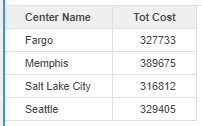
ka0PW0000001Ji8YAE_0EM2R000000o9RC.jpeg

SQL Statements 


Pass0 - 	Query Pass Start Time:		3/3/2020 4:21:02 PM
	Query Pass End Time:		3/3/2020 4:21:04 PM
	Query Execution:	0:00:00.01
	Data Fetching and Processing:	0:00:00.00
	  Data Transfer from Datasource(s):	0:00:00.00
	Other Processing:	0:00:01.68
	Rows selected: 4
select	a11.CALL_CTR_ID  CALL_CTR_ID,
	sum(a11.TOT_COST)  WJXBFS1
from	dbo.CITY_CTR_SLS	a11
	join	(select	a11.CALL_CTR_ID  CALL_CTR_ID
	from	dbo.CITY_CTR_SLS	a11
	group by	a11.CALL_CTR_ID
	having	sum(a11.TOT_COST) < 400000
	)	pa12
	  on 	(a11.CALL_CTR_ID = pa12.CALL_CTR_ID)
group by	a11.CALL_CTR_ID

Pass1 - 	Query Pass Start Time:		3/3/2020 4:21:04 PM
	Query Pass End Time:		3/3/2020 4:21:04 PM
	Query Execution:	0:00:00.00
	Data Fetching and Processing:	0:00:00.00
	  Data Transfer from Datasource(s):	0:00:00.00
	Other Processing:	0:00:00.00
[Populate Report Data]

[Analytical engine calculation steps:
	1.  Perform cross-tabbing
]

to  CITY_CTR_SLS_1


Strategy Internal Reference number for this technical note is KB483573, KB484110, DE140604 and DE160497.


Comment

0 comments

Details

Knowledge Article

Published:

March 9, 2020

Last Updated:

March 21, 2024