Prior to Strategy 2019 Update 2, health checks were automatically performed on Platform Analytics installations when Platform Analytics Consumer was started. This health check analyzed the status of the Platform Analytics MySQL Warehouse, Redis Server, and Kafka Cluster.
Starting in Strategy 2019 Update 2, an additional tool allows administrators to manually perform health checks without restarting Platform Analytics. This new tool includes the original checks listed above, as well as checks to test the Intelligence Server object telemetry and Platform Analytics statistics logging. Usage is as follows:
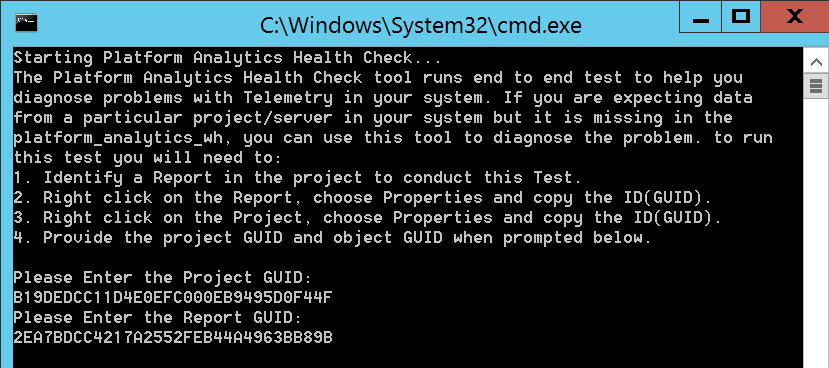
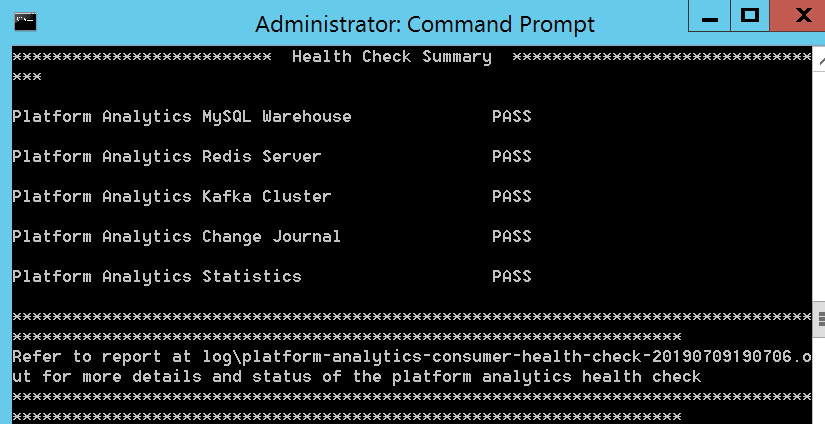
If issues are encountered during the health check, the health check log suggests corrective actions:
07/08/2019 16:27:31.879 INFO Change Journal Health Check Consumer configured to consume from last offset
07/08/2019 16:27:43.661 INFO Starting Intelligence Server Change Journal Producer Test
07/08/2019 16:32:43.717 ERROR Change Journal log for Object with GUID: 2840589948B7F9B817CBB18BC32F91E2 in project GUID B19DEDCC11D4E0EFC000EB9495D0F44F not found in kafka topic.
Change Journal Producer Test status: Fail
07/08/2019 16:32:43.717 ERROR Please follow the steps below to verify that the Intelligence Server is correctly configured to write the telemetry to Kafka:
1. Connect to your Intelligence Server though Command Manager.
2. Run the command:
   'LIST ALL FEATURE FLAGS;'
3. In the results verify that feature flag with the name 'Messaging Service for Platform Analytics' is 'ON'.
4. If it is 'OFF', run the below command to turn it 'ON'
   'ALTER FEATURE FLAG "Messaging Service for Platform Analytics" ON;'
5. Next Run the command:
   'LIST PROPERTIES FOR SERVER CONFIGURATION;'
6. In the result verify that property 'Telemetry Server enabled' is set to True.
If it is set to False. Execute the below command to enable this property:
'ALTER SERVER CONFIGURATION ENABLEMESSAGINGSERVICES TRUE CONFIGUREMESSAGINGSERVICES "bootstrap.servers: tec-l-002429.labs.Strategy.com:9092,tec-l-001614.labs.Strategy.com:9092,tec-l-001613.labs.Strategy.com:9092/batch.num.messages:5000/queue.buffering.max.ms:2000";
7. If the 'Telemetry Server enabled' property is already set to True. Restart your Intelligence Server for it to be effective
07/08/2019 16:32:43.717 INFO Change Journal End-to-End Test health check result is unhealthy.
